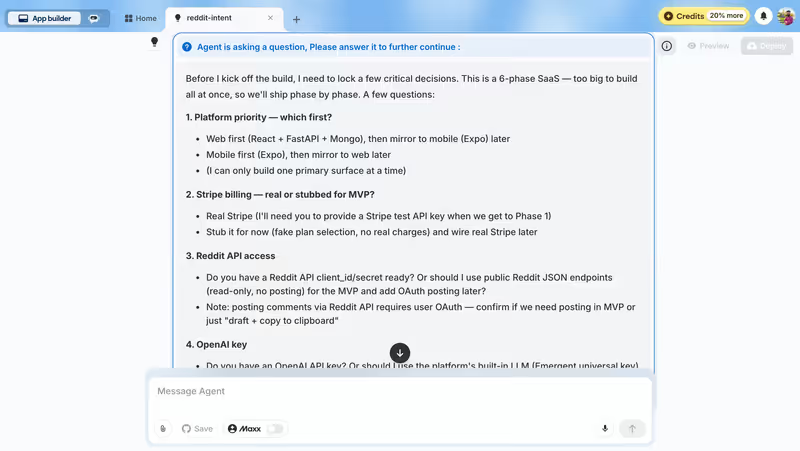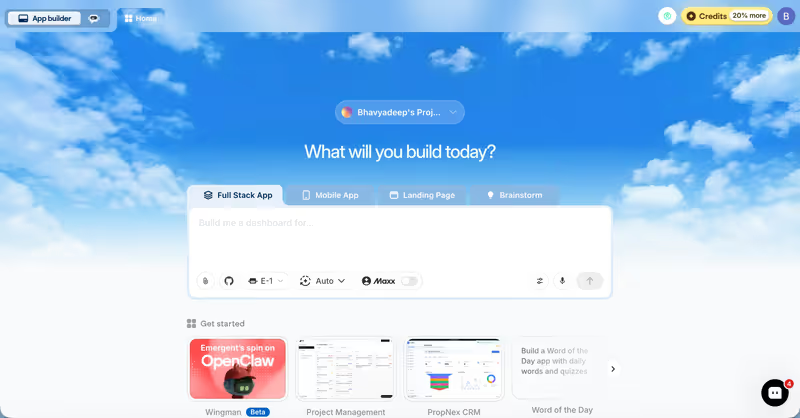
What is Emergent?
Emergent is a cloud-based generative AI platform designed to compile full-stack web and mobile applications from conversational prompts. By entering natural language inputs, users instruct Emergent to scaffold PostgreSQL databases, backend routing systems, UI configurations, and server deployments in a single pass.
 Emergent product snapshot
The system relies on autonomous “edit agents.” Once an app is created, you edit components by chat. Instead of coding local edits, you describe changes, and Emergent’s agents attempt to implement modifications across the backend and frontend.
What types of applications can you build with Emergent?
Emergent targets full-stack web and mobile configurations:
- Interactive SaaS MVPs: Scaffold user subscription portals, payment flows, and data entry forms.
- Basic Web Portals: Build multi-user pages, databases, and login pages.
- Mobile Concept Drafts: Compile simple layouts for mobile browsers.
However, because the platform compiles and deploys complex code packages in isolated containers, building stable business systems (like partner portals, internal company CRM dashboards, or supplier tools) is difficult to secure.
Where Emergent genuinely shines
Emergent’s main benefit is speed. It can generate working backend routing, database tables, and styled UI blocks in under 10 minutes from a single prompt. For solo founders looking to build a rapid visual prototype to validate an idea, it provides a fast sandbox.
It supports task forking, letting builders branch their application states to test modifications. Additionally, the $200/month Pro tier features Ultra Thinking modes and system prompt editors, giving developers deeper control over model behaviors.
The engineering overhead & setup complexity
While initial generations are fast, maintaining an Emergent project introduces significant technical and financial overhead:
- Heavy Edit Agent Expenses: Emergent’s system relies on edit agents. If you request a small update (such as changing a button color or modifying a text field), it boots an edit agent that scans the codebase, consuming credits heavily. Users report spending thousands of dollars on minor tweaks.
- Regression and Undo Loops: As the codebase grows, the context window struggles. Edit agents frequently revert completed work, introduce bugs, or get stuck in debugging loops.
- Wake Errors and Downtime: Builders report container errors (e.g. “Error Waking Up Agent”) that block access to the backend database, stalling projects for days.
The pricing gotchas & token/credit model
Emergent’s pricing relies on a monthly credit pool:
- No Roll-over Rules: Standard plan credits ($20/month for 100 credits) do not roll over. If you don’t use them, they disappear.
- Expensive Bug Debugging: If the AI introduces a compile error, you must spend credits asking it to repair the code.
- Predatory Auto-Renewal Accusations: Users report that purchasing what they thought were one-time top-up credit packages resulted in automatic monthly subscriptions without clear billing alerts.
Public Sentiment & Community Consensus
Feedback on developer subreddits and tech blogs highlights significant financial drain:
- The Credit Sinkhole: Solo founders warn that Emergent can become a major money sink. Some report spending nearly $10,000 AUD on edit agents to fix the same bugs repeatedly.
- Blocked Environment Access: Developers express frustration with slow customer support when backend containers freeze or fail to compile.
- Unstable Scale Wall: Community threads warn that once an application codebase exceeds a few thousand lines of code, the edit agents struggle, resulting in broken pages.
For teams looking to build secure B2B client portals, internal databases, or team tools, managing AI code generators is expensive and risky. If you’re building B2B systems, Softr is a much more practical choice. Softr’s AI Co-Builder generates complete apps from a prompt - database, pages, user permissions, and navigation - and stores your data in Softr Databases natively (or pulls from any of 17 external sources like Airtable or Google Sheets). Because there’s no generated code underneath, you’ll never hit regression loops, billing spikes, or container wake errors. Built-in auth, user groups, and role-based permissions come standard on every plan, so business teams can launch a production-ready client portal or internal tool without touching code or worrying about what breaks next.
Verdict: Who is it actually for?
Best for: Technical founders who need to rapidly generate a full-stack code skeleton for a startup MVP, have the budget to cover edit agent credits, and can maintain the code manually.
Not for: Non-technical operators or business managers who need a secure, stable B2B portal or internal database without expensive credit bills or regression loops.