

Cursor and Emergent both promise faster software creation, but they sit in different categories. Cursor is an AI-first coding IDE built for developers working inside a VS Code-style environment, while Emergent is a prompt-driven full-stack AI scaffolding platform that tries to generate the app, backend, database, and hosting for you.
The people comparing them are usually technical founders, ambitious non-coders, or product teams trying to shortcut a build. What is actually at stake is not just first-day speed, but whether you want to own the engineering work yourself or outsource more of it to an AI system that may be expensive to correct later. Cursor usually wins on control and code-level sanity. Emergent usually wins on initial scaffolding speed. The catch is that speed, cost, and reliability do not stay aligned for very long.
Meet the Contenders
What is Cursor?
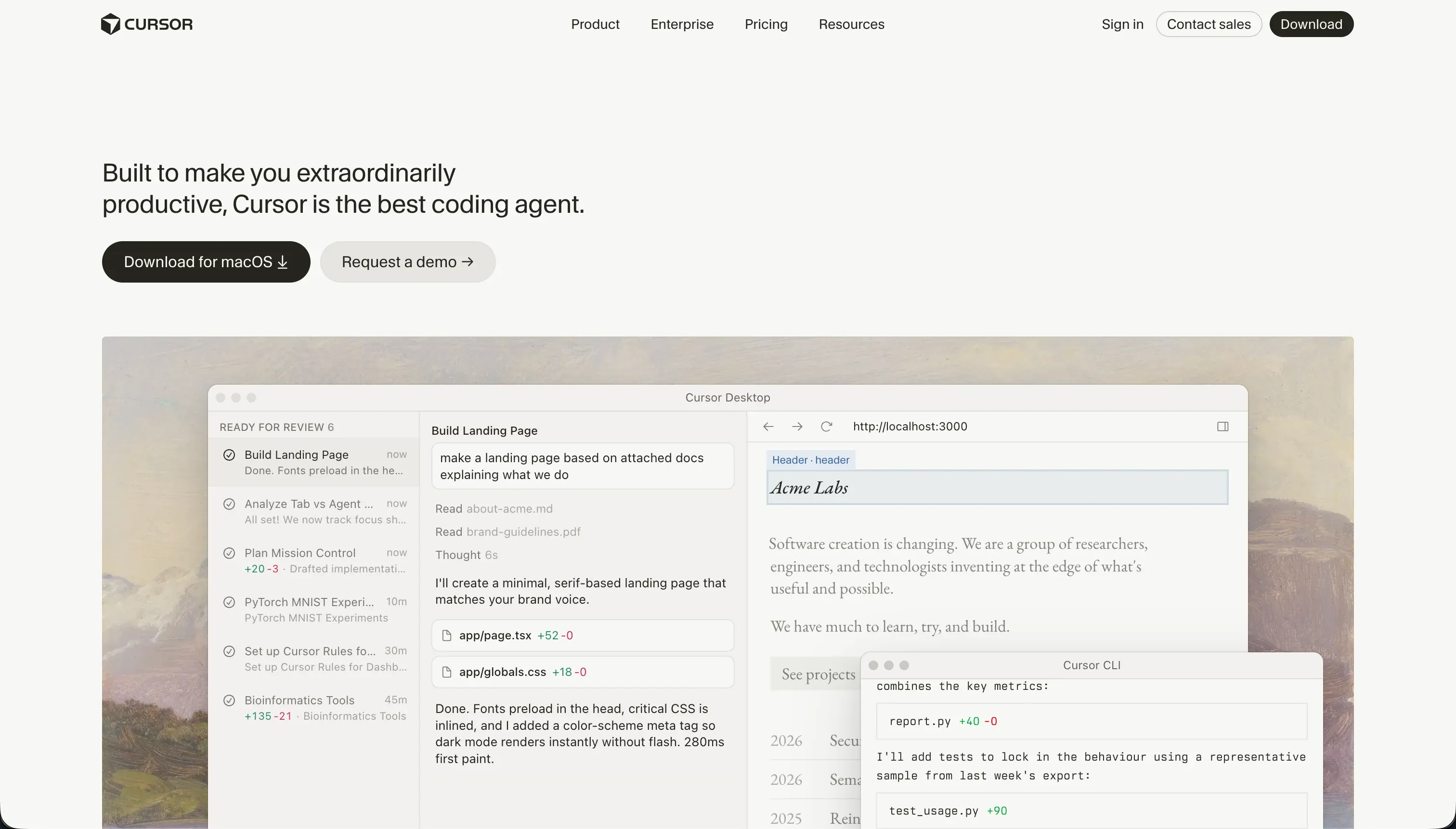
Cursor is an AI-first code editor built on a fork of VS Code. It is not an app generator in the same sense as most vibe-coding tools. It is an IDE for people who still intend to work with code, just with a lot more AI help embedded into the workflow.
In practice, Cursor works by indexing your codebase, letting you reference files and symbols with @ mentions, and using features like semantic code search, inline generation, smart autocomplete, and Composer agent mode to edit across multiple files. It keeps the normal extension ecosystem and familiar editor feel of VS Code, which is why many developers can adopt it without changing their whole stack or workflow.
It is genuinely built for engineers, technical founders, and serious builders who already understand project structure, packages, terminals, and debugging. The people most frustrated by it are non-technical users who hoped AI would remove the need to think like a developer, plus teams who run into CPU-heavy indexing, opaque fast-query limits, or multi-file agent changes that create subtle breakage.
| Spec | Details |
|---|---|
| Primary Stack | AI-assisted code editor built on a VS Code fork for local software development |
| Interface | Code editor with chat, autocomplete, semantic search, and Composer agent mode |
| Primary Deployment Target | No native hosting layer - developers ship through their own stack and deployment pipeline |
| Key Advantage | Strong codebase awareness and fast refactoring inside a familiar developer environment |
What is Emergent?

Emergent is an AI-powered application builder that generates full-stack apps from natural-language prompts. Unlike Cursor, it aims to own much more of the stack for you by scaffolding frontend, backend, database, and hosting in one workflow.
In practice, you describe the app in chat, let Emergent generate a working scaffold, then keep revising through conversational edits. Its core promise is prompt-to-application scaffolding, built-in cloud deployment, and conversational revisions to workflows, styling, database structures, and copy, plus GitHub integration on paid plans.
It is genuinely built for founders, makers, and non-developers who want a live app quickly without setting up infrastructure themselves. The people most frustrated by it are users who need reliability after launch, because research and community complaints repeatedly point to unstable containers, “Error Waking Up Agent” issues, heavy credit drain during bug-fixing loops, and cases where the AI appears to undo work you already paid to generate.
| Spec | Details |
|---|---|
| Primary Stack | AI-generated full-stack web app platform with managed backend, database, and hosting |
| Interface | Conversational prompt builder with iterative chat-based revisions |
| Primary Deployment Target | Hosted web apps on Emergent’s cloud with public previews and private hosting on paid plans |
| Key Advantage | Very fast prompt-to-app scaffolding that bundles frontend, backend, database, and deployment |
The Core Difference
The biggest gap here is not AI quality in the abstract. It is whether you want AI to assist your engineering workflow or replace large chunks of it with managed scaffolding.
- Cursor runs as a developer IDE first, which means you keep architectural control but also keep all the normal responsibility for coding, debugging, infra, and deployment.
- Emergent runs as a prompt-driven full-stack generator, which means you get faster scaffolding and hosting out of the box but accept more platform dependence, credit sensitivity, and AI regression risk.
Head-to-Head Comparison
We evaluated both platforms across four core categories.
1. Developer Experience & Iteration Speed
Cursor is slower in the first 15 minutes because it does not generate a whole product from one sentence. You still need to know your framework, shape the project, run builds, and connect your own backend. But once the repo exists, Cursor’s codebase indexing, semantic search, inline refactoring, and Composer agent mode make day-to-day iteration very fast for real developers.
The weakness is that AI acceleration is still wrapped inside a serious IDE, not a safety net for beginners. User complaints mention Composer loops, broken package dependencies, and even Tailwind config damage while burning through fast queries. If you cannot inspect diffs and fix the mess yourself, Cursor’s speed advantage disappears fast.
Emergent is much faster at the first draft. You can prompt a full-stack app into existence, get backend schema and hosting provisioned, and share a live preview without doing the normal setup work. For founders who want a working skeleton today, that is the appeal.
The problem is that iteration appears to become expensive and unstable once the app gets more complex. Multiple reports describe the AI undoing finished work, triggering the edit agent for tiny changes, or getting stuck in debugging loops that consume credits. That makes Emergent feel faster at generation than at controlled iteration.
Edge: Cursor, because Emergent is quicker to start but Cursor is the healthier environment for repeated edits once a serious developer is involved.
2. Code Quality & Portability
Cursor has the cleaner code-ownership story because the code is yours to begin with. It works on your local project, uses a familiar editor model, and stays compatible with standard VS Code extensions and normal Git workflows. That means portability is native rather than bolted on later.
Its limitation is that Cursor does not solve architecture for you. Good output still depends on the underlying repo, your framework choices, and your ability to review AI edits. But if you care about long-term control, there is no proprietary export conversation here in the same way there is with full-stack generators.
Emergent offers GitHub integration on Standard and above, which is better than pure closed-box builders and does give technical teams some way to inspect or continue work. That is a real point in its favor compared with tools that never let your code leave.
Still, the practical experience looks murkier than the checkbox suggests. Community feedback focuses much more on managed environment issues, blocked backend access, and preview-versus-production gaps than on smooth migration stories. So yes, there is some code portability on paper, but the lived experience still looks quite platform-bound.
Edge: Cursor, because owning the repo from day one is a much stronger portability story than partial escape hatches from a managed generator.
3. Database & Backend Capabilities
Cursor gives you no turnkey database or backend layer. That sounds like a weakness, and for non-developers it absolutely is, because you must manually choose your database, auth flow, API architecture, and deployment model. Cursor will help write the code, but it does not provide the backend as a product.
For developers, though, this is also freedom. You can use whatever stack fits the job instead of accepting a managed default. The tradeoff is obvious: more flexibility, more engineering overhead, and zero help if you were hoping for built-in auth or a one-click database.
Emergent’s promise is far stronger here at the surface level. It scaffolds backend schema, database routing, and deployment from prompts, which is exactly what makes it attractive to non-technical founders who do not want to wire infrastructure themselves.
The downside is trust and control. Reports mention scale breakdown on larger codebases, trouble fixing bugs after deployment because production does not match preview, and backend-access problems during container issues. So Emergent wins on convenience, but the research does not support treating it as a highly trustworthy long-term backend foundation.
Edge: Emergent, because it at least gives you a backend and database path out of the box, while Cursor gives you nothing unless you build it yourself.
4. Hosting & Deployment Options
Cursor has no native hosting answer. You need to decide how the app gets deployed, where the database lives, how secrets are managed, and what production pipeline you trust. For experienced developers, that is normal. For everyone else, it is extra work that Cursor does not remove.
The upside is that you are not trapped in someone else’s deployment model. The downside is obvious time cost. If your goal is instant public previews or zero-setup hosting, Cursor is simply not trying to compete there.
Emergent’s built-in cloud deployment is one of its strongest selling points. It automatically configures hosting and provides public preview links, which makes demos and early-stage launches much easier than a local IDE ever could.
But the user complaints here are not small footnotes. Research points to container latency, unresponsive environments, “Error Waking Up Agent” failures, and cases of blocked backend access during deployment issues. Hosting is convenient only while the managed environment behaves.
Edge: Emergent, because built-in hosting and previews beat Cursor’s DIY deployment burden, even if the reliability story is shaky.
5. AI Quality & Reliability
Cursor’s AI is strongest when it can read and operate on a real codebase. Full-project awareness, semantic search, inline editing, and Composer give it a much better shot at context-sensitive work than generic chat tools. That is why many developers use it for refactors, docs, tests, and multi-file edits instead of just code autocomplete.
The reliability issue is that agent mode can still go off the rails. Users report infinite loops, unintended config changes, high CPU usage on large repos, and fast-query limits that run out sooner than expected. Cursor is powerful, but you still need adult supervision.
Emergent’s AI is more ambitious because it is trying to generate the whole application, not just assist coding inside one. That makes it impressive in demos and early scaffolding, especially for people who want frontend, backend, and deployment configured from a prompt.
The problem is that the AI appears to be the source of many of its own costs. Complaints repeatedly mention bug-fixing loops, repeated charges for the same work, credits consumed by platform-side failures, and production bugs that are harder to solve than the preview suggested. That is the dark side of AI being your builder and your repair mechanic at once.
Edge: Cursor, because its AI is narrower but more dependable when a real developer is reviewing the output.
6. Learning Curve & Onboarding
Cursor is easier to learn for developers because it looks and behaves like a VS Code derivative. If you already live in an IDE, the transition is mild, and plans like Pro at $20 per month are accessible enough for experimentation.
It is still a bad fit for true beginners. The product assumes comfort with files, terminals, dependencies, and debugging. Cursor does not remove the need for engineering judgment. It just compresses some of the typing and searching work.
Emergent is easier in the first hour for non-technical users because the model is simple: describe what you want, let the AI scaffold it, and keep revising through chat. The Free plan with 10 monthly credits lowers the barrier to testing that flow.
Over time, the learning curve gets more deceptive. Users still have to reason about bugs, regressions, deployment issues, and credit consumption, just without the visibility of a normal code workflow. So Emergent is easier to start, but not always easier to own.
Edge: Emergent for initial approachability, because Cursor still assumes real engineering skills from the start.

Pricing Comparison
Cursor:
- Hobby - $0 with 50 fast queries
- Pro - $20/mo with 500 fast queries per month
- Pro+ - $60/mo with 1,500 fast queries per month
- Ultra - $200/mo with 10,000 fast queries
- Business/Teams - $40/mo per user
- Bugbot Addon - Free or $40/mo per user
Emergent:
- Free - $0 with 10 monthly credits
- Standard - $20/mo billed annually with 100 credits per month, private project hosting, GitHub integration, and task forking
- Pro - $200/mo billed annually with 750 credits per month, 1M context window, Ultra Thinking, system prompt editing, custom AI agents, and high-performance computing
- Enterprise - Custom pricing
- Top-ups - $10 for 50 credits, with some overage structures or promotions listing $8 for 50 credits
Use Case Fit: When to use which?
When to choose Cursor
- Choose Cursor when you are already a developer and want AI to accelerate real coding work inside a familiar IDE.
- Choose Cursor when code ownership, Git workflows, and architectural control matter more than one-click app scaffolding.
- Choose Cursor when you are comfortable setting up your own database, auth, hosting, and deployment pipeline.
When to choose Emergent
- Choose Emergent when you want a prompt-generated full-stack app with backend, database, and hosting included from the start.
- Choose Emergent when you care more about fast prototypes and live previews than about pristine code control.
- Choose Emergent when you can tolerate a credit-based model and the risk of regressions while iterating through chat.
When neither Cursor nor Emergent is the right fit
For internal tools and client portals
Neither Cursor nor Emergent is the clean answer for a company that just needs a CRM, partner portal, vendor dashboard, or internal workflow app to work reliably for real users. Cursor expects engineering skill and a custom stack. Emergent gives you scaffolding, but the research around credit burn, preview-versus-production drift, and repeated bug-fixing loops is exactly the kind of day-two instability business teams should avoid.
This is where Softr is the more honest fit. It starts with Softr Databases as the native option, then gives you built-in auth, user groups, permissions, hosting, workflows, and AI Co-Builder support without forcing you into AI-only maintenance. For internal tools and client portals, that usually ages much better than either coding everything in Cursor or re-prompting a fragile generated app in Emergent.
For native mobile apps
Neither tool is a great answer if your actual target is the Apple App Store or Google Play with a genuinely native mobile experience. Cursor can certainly help a developer build a mobile app if they choose the right stack, but it is not a mobile builder. Emergent says it can build web and mobile experiences, yet the research specifically notes that mobile workflows feel less mature than its web experience.
If native mobile distribution is the brief, start with FlutterFlow. It is built around mobile-first app creation and is far more credible for shipping app-store-ready experiences than either a desktop IDE like Cursor or a still-maturing prompt generator like Emergent.
For browser-based developer environments
There is also a middle case where you do want a real developer workflow, but you do not want to manage everything locally. Cursor is excellent if you already like local development, while Emergent is too opaque if what you really need is terminal access, files, and a more conventional coding setup rather than managed full-stack generation.
That is where Replit is a better fit. It gives you a more complete in-browser developer environment than Emergent and a less local-machine-dependent workflow than Cursor. If your goal is serious coding with AI help in the browser, Replit makes more sense than either of these two extremes.

Verdict
Pick Cursor if you are a developer first and want AI to make a real coding workflow faster. The tradeoff is that Cursor does not remove infrastructure work, product architecture, or debugging responsibility. You still own the hard parts. It just gives you a strong editor, better codebase context, and faster multi-file assistance while you do them.
Pick Emergent if you want to skip setup and get a hosted full-stack skeleton live quickly. The tradeoff is that you are betting much more on a managed AI system whose costs and behavior can get ugly once debugging starts. Prompt-to-app speed is real here, but so are the reports of credit drain, repeated fixes, and unstable environments.
That is the day-two dividing line. Cursor gives you more work upfront but fewer illusions about who is in control. Emergent gives you a stronger first impression but a shakier long-term maintenance story. And if your real use case is a business app for employees, clients, or partners, something like Softr often ages better than either because it ships the boring but critical pieces - auth, permissions, database, hosting, workflows - without turning every future edit into a coding problem or a credit-draining prompt loop.

Summary Comparison Table
| Criterion | Cursor | Emergent |
|---|---|---|
| Best for | Developers accelerating existing coding workflows | Founders and makers who want fast full-stack scaffolding |
| Build paradigm | AI-assisted IDE | Conversational AI scaffolding platform |
| Output type | Your own codebase in a local dev workflow | Managed generated app with hosted previews |
| Database | Bring your own database and backend | Managed generated backend and database routing |
| Pricing metric | Fast-query limits by plan | Monthly credits plus optional top-ups |
| Maintenance burden | High, but transparent and developer-controlled | Potentially high and credit-sensitive after generation |
| Code export | Native, because you work in your own repo | Some GitHub path, but still more platform-bound |