

Bolt and Cursor both carry “AI developer tool” labels, but they solve the same underlying challenge from completely different angles. Bolt asks: what if the entire development environment - editor, terminal, build server, preview window - lived in a browser tab, and AI scaffolded the project for you? Cursor asks: what if the IDE you already use became radically smarter about your codebase, helping you write and refactor code faster without leaving your local workflow? Both are legitimate answers. They’re just optimizing for different constraints.
Meet the Contenders
The workspace architecture of these two tools is fundamentally different, and it determines everything downstream about how you develop, debug, and iterate.
What is Bolt?

Bolt (bolt.new) is a browser-native development environment built on StackBlitz’s WebContainers technology. It runs a complete Node.js runtime directly inside your browser tab - with a live terminal, an npm package manager, an active development server, and a real-time preview window. The AI assistant scaffolds full-stack React applications from text prompts, generates code changes in a live editor panel, and lets you install custom packages and run terminal commands without ever leaving your browser. Projects can be synced to GitHub, deployed to Netlify, or exported as standard Vite codebases.
| Spec | Details |
|---|---|
| Primary Stack | React, Node.js, Tailwind CSS, Vite (via WebContainers) |
| Interface | Natural language chat + browser-native IDE with live terminal |
| Primary Deployment Target | Bolt Host, Netlify, or GitHub sync |
| Key Advantage | Zero-setup browser environment with full npm package support and live preview |
What is Cursor?
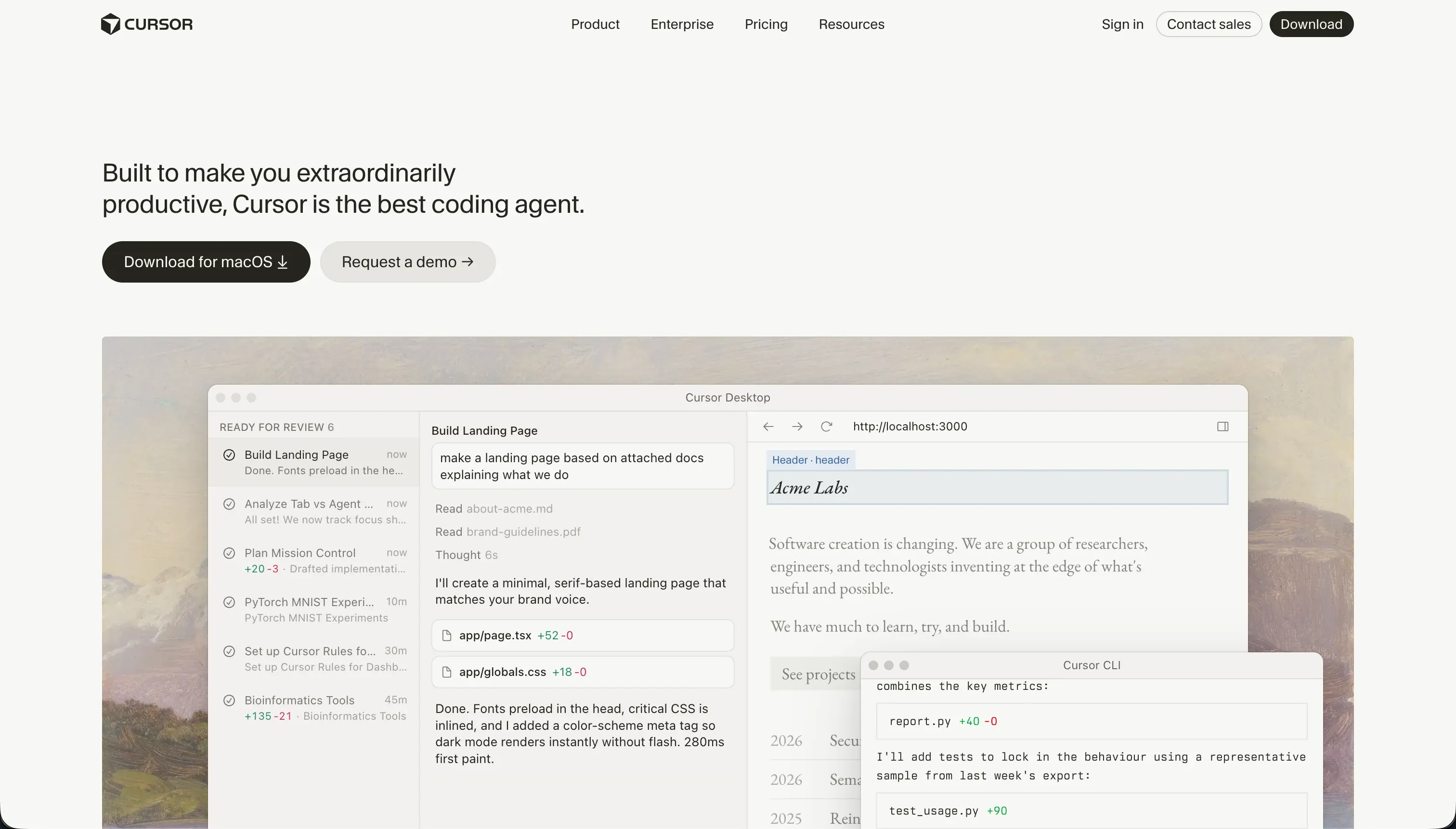
Cursor is an AI-first code editor built as a fork of VS Code. It indexes your entire local repository so the AI has full context: files, symbols, function signatures, and logic structures across the project. You reference specific code using @ mentions in chat, semantic search finds relevant implementations without exact string matching, and Composer (Agent Mode) delegates multi-file editing tasks to an AI agent that plans and executes changes across the codebase simultaneously. All VS Code extensions, themes, keybindings, and git integrations work identically.
| Spec | Details |
|---|---|
| Primary Stack | Language-agnostic (React, Next.js, Python, Go, Rust, TypeScript, etc.) |
| Interface | Desktop IDE + codebase-indexed chat + Composer Agent Mode |
| Primary Deployment Target | Local file system and Git repositories |
| Key Advantage | Full codebase context indexing with VS Code extension and git workflow compatibility |
The Core Difference
Both tools use AI to help developers write code faster - but the environment where that work happens is completely different, and it shapes every practical trade-off between them.
Bolt runs in your browser. The Node.js runtime, the package manager, the build tools, the live preview - all of it runs client-side in a browser tab using WebContainers technology. This means zero local environment setup. You open a browser, paste a prompt, and you’re building. The downside is that running a full development environment inside browser memory is resource-intensive, and larger projects push browser resource limits in ways that cause freezes, container timeouts, and crashes.
Cursor runs on your machine. It’s a local application that edits local files. The AI context comes from indexing your local repository. There’s no development server running inside Cursor - you run your own local dev server in your own terminal as you always have. This is the familiar developer setup, with AI layered on top. The trade-off is that you need a working local environment before Cursor is useful: Node installed, dependencies configured, git initialized, a terminal you’re comfortable using.
Put simply: Bolt removes the need for a local development environment. Cursor makes an existing local development environment dramatically more productive. They’re not competing for the same workflow.

Head-to-Head Comparison
1. Developer Experience & Iteration Speed
Bolt’s zero-setup experience is its strongest selling point. Paste a prompt, and within a couple of minutes you have a live React application with a real preview window, running in the same browser tab where you’re working. No Node, no npm install, no local server command. For developers who switch between machines frequently, work in restricted corporate environments, or just want to prototype something fast without rebuilding a local stack, this is genuinely valuable.
The iteration experience gets more complicated as projects grow. Bolt’s most documented failure mode is the “Project too large” account lock, which blocks new prompts based on workspace size limits rather than token balance. Users on r/boltnewbuilders have described sitting on 50 million unused tokens and being unable to make any new prompts because the project crossed an internal size threshold. Token burning in debugging loops is another consistent complaint: when Bolt’s AI introduces an error and then generates repeated attempts to fix it, each failed attempt consumes tokens without making progress - burning through a significant portion of a monthly token allowance in a single session.
Bolt also has a documented tendency toward code regression during feature additions. Adding a new component to a Bolt project can cause the AI to overhaul the visual layout of unrelated pages, dropping custom CSS rules or reverting previously working features. Developers on r/boltnewbuilders describe this as Bolt “messing up entire existing, fully functioning pieces of code with complete overhauls of looks and appearance” during straightforward prompts.
Cursor’s iteration speed advantage is at the opposite end of the project lifecycle - not at the start, but once you have a codebase worth working in. Codebase-wide context means the AI understands how your components connect, what your data models look like, and how your routing is structured. Asking Cursor to add a feature to an existing project produces far more contextually accurate results than asking a stateless AI assistant the same question. Composer mode can open, read, and edit multiple files simultaneously based on a single task description - genuinely useful for refactoring, feature implementation, or test writing that touches several parts of the codebase.
Cursor’s reliability failure mode is Composer’s agent loop problem. When the AI gets stuck on a dependency conflict or an incorrect configuration, it can cycle through repeated fix attempts that each consume fast queries. Users on r/cursor document Composer “burning through all my fast credits in an hour” on a single stuck bug. When fast queries are exhausted, slow queries replace them at 2-3 minute wait times per prompt, effectively halting active development.
2. Code Quality & Portability
Bolt’s code output is clean for initial scaffolding. The generated React/Vite directory uses standard npm packages, standard component structures, and standard Tailwind CSS styling. There’s no proprietary runtime or custom format - you can download the project and work on it in any editor or deploy it to any hosting provider. GitHub sync is built-in, making version control straightforward.
The code quality concerns appear during iterative development. Bolt’s tendency to overhaul adjacent sections during feature prompts means the code that was working yesterday may have been visually regressed today. This is a practical code quality issue: the generated output after several rounds of prompting can be harder to read and maintain than the initial scaffold, because the AI has made sweeping changes to files it wasn’t specifically asked to touch.
Cursor adds no code quality of its own - it edits whatever code already exists in your project. The quality of Cursor’s contributions depends on the AI model it’s using and the quality of context it has about your project. For well-structured, thoroughly indexed codebases with clear naming conventions and good documentation, Cursor’s suggestions and agent edits are consistently accurate. For messy legacy codebases with inconsistent patterns, Cursor’s context indexing helps it navigate, but it can also propagate existing bad patterns in its suggestions.
Both platforms offer complete code portability. Bolt exports standard files. Cursor works on local files that already belong to you.
3. Database & Backend Capabilities
Bolt is frontend-focused by default. It generates React UI code confidently and quickly. Database connectivity is where its AI-assisted workflow shows strain. Connecting Bolt to a production backend requires manual configuration: Supabase API keys, environment variables, SQL table definitions, and Row Level Security policies. The AI can write this code, but it requires careful review. AI-generated RLS policies have been documented as occasionally misconfigured in ways that expose user data across accounts. Bolt has no native database admin UI - everything is code you inspect manually.
One option within Bolt’s cloud infrastructure is using Bolt’s managed database and authentication features (included in Bolt Cloud). This provides a database instance without setting up external services, but it ties your data more tightly to the Bolt ecosystem and limits your control over the database configuration.
Cursor writes database code for whatever stack you’re using. If you’re using Prisma with PostgreSQL, Cursor indexes your schema files and writes type-safe queries. If you’re using the Drizzle ORM, Cursor understands the pattern and generates appropriate code. If you’re writing raw SQL, Cursor provides inline completions and can generate migration scripts. The database architecture is entirely your design - Cursor helps you express it in code, but every security decision is yours to make.
This level of control is what experienced developers prefer. Database provisioning, security hardening, and migration management are engineering disciplines, and Cursor doesn’t abstract them away - it helps you do them well.
4. Hosting & Deployment Options
Bolt’s hosting workflow is one of its standout features. You can deploy a live preview to a .bolt.host URL with one click, push to Netlify with another click, or sync to GitHub for integration with any CI/CD pipeline. On paid plans, custom domains, SEO settings, and analytics integrations are available. For developers who want a working URL to share with a client or stakeholder within the same session as building the prototype, Bolt’s deployment speed is hard to beat.
The scale ceiling matters here, though. Bolt’s browser-based WebContainers technology is optimized for development-sized projects. As projects grow - more components, more dependencies, more complex state management - the browser runtime becomes a constraint. Product Hunt reviews document “Out of Memory” errors and container crashes on larger files, which interrupt development sessions and occasionally require starting a new project to resolve.
Cursor has no hosting capabilities. Deployment is entirely the developer’s responsibility. Vercel, Netlify, AWS, Railway, Fly.io, self-hosted VPS - wherever you want to run it. This gives unlimited flexibility and no hosting lock-in, but adds the operational overhead of configuring and managing deployment infrastructure. For developers with existing DevOps setups, this isn’t a constraint - it’s how they’d deploy regardless of which editor they’re using.

Pricing Comparison
The billing models are similar in structure (subscription plus usage limits) but differ in the specific constraint they optimize for.
Bolt bills on token consumption:
- Free: $0 - 1 million tokens/month, 150k daily cap, public projects only.
- Pro: $25/month - 10 million tokens, private projects, custom domains, token rollover (2 months max).
- Token tiers scale: 26M ($50/month), 55M ($100/month), up to 1.2 billion tokens ($2,000/month).
- Teams: $30/member/month base, same token tier scaling.
Token rollover on Bolt is contingent on maintaining an active subscription. If your subscription lapses, rolled-over tokens expire. Multiple Reddit users describe this as “predatory” since tokens are paid for and then expire if payment is interrupted. The “Project too large” account-level block (unrelated to token balance) is the bigger practical concern for active developers.
Cursor bills on fast query limits:
- Hobby: $0 - 50 fast queries/month.
- Pro: $20/month - 500 fast queries/month.
- Pro+: $60/month - 1,500 fast queries/month.
- Ultra: $200/month - 10,000 fast queries/month.
- Business/Teams: $40/user/month - centralized billing, team controls.
- BugBot Add-on: Free or $40/user/month for AI-assisted bug tracking.
At $20/month, Cursor Pro is cheaper than Bolt Pro by $5, but the 500 fast query limit is a real constraint for developers in heavy Composer mode sessions. When fast queries are exhausted, slow queries at 2-3 minutes each make active prompting impractical. Users building actively report hitting the Pro limit within two weeks of heavy development work.
For developers primarily using autocomplete rather than Composer mode, the query limits matter far less - fast queries are only consumed by explicit chat and agent interactions, not by every autocomplete suggestion.
Use Case Fit: When to use which?
When to choose Bolt
- You want to prototype and preview a full-stack React application in your browser with zero local setup.
- You’re starting a new project from scratch and want AI scaffolding to get the structure right quickly.
- You want a visual preview tab open next to your code editor while you’re building.
- You need to share a live URL with a client or stakeholder within the same session as building.
- You’re switching between machines and don’t want to maintain a synchronized local development environment.
- You want prompt-driven development with an escape hatch to a real terminal when the AI falls short.
When to choose Cursor
- You’re a developer working in an existing local codebase that you want AI to understand deeply.
- You need full VS Code extension compatibility and your existing keyboard shortcuts and git workflow.
- You’re doing substantial refactoring or feature work that touches multiple files, and Composer’s multi-file editing would save hours.
- You’re working on a long-running project where codebase-wide context produces better AI suggestions than stateless prompting.
- You want the AI to help you write specific framework code (Prisma schemas, TypeScript types, test cases) with awareness of your project’s existing patterns.
When neither Bolt nor Cursor is the right fit
For native mobile apps
Bolt generates web applications and cannot produce native iOS or Android app packages for the App Store or Google Play without significant manual developer work (Capacitor integration, signing, submission). Cursor can write React Native or Expo code that targets mobile stores, but this requires mobile development expertise, not just prompting. For a visual, AI-assisted native mobile development workflow that produces genuine App Store and Google Play submissions, FlutterFlow is the standard. It compiles directly to native Dart code using Flutter’s widget engine, with built-in support for the app submission process.
For internal tools and client portals
Both Bolt and Cursor produce codebases that require ongoing developer maintenance. When a business operations team wants to add a user role, change a filter, or update a workflow in their internal tool, they need a developer to implement, test, and deploy the change. For organizations building production business software where non-technical team members need to maintain the tool over time, Softr eliminates that dependency. Softr’s AI Co-Builder scaffolds the full application with authentication, database, and permissions integrated from the start - and the visual editor lets non-technical admins update layouts, permissions, and data connections without re-prompting or writing code. Flat monthly pricing with unlimited builders makes the total cost predictable regardless of how many team members are maintaining the tool.
For professional developer environments
If you’re evaluating Bolt versus Cursor and neither feels like the right fit, the missing context is usually one of two things: you want cloud-hosted collaborative development with full VM access (not browser WebContainers), or you need a local IDE with deeper language server integrations than Cursor offers. For cloud-hosted collaborative development with complete virtual machine control, Replit provides full VMs in the browser with Replit Agent for project generation - a more complete cloud environment than Bolt’s browser-constrained WebContainers. For local development, Cursor is already the strongest option in its category for most developers.

Verdict
Bolt and Cursor are not direct substitutes - they suit different developer profiles and different stages of a project.
Choose Bolt if you want to get something built and running in a browser with no local environment setup, and you’re comfortable with the token billing model and its account-level workspace locks. It’s a genuinely useful tool for scaffolding prototypes, sharing live previews, and iterating quickly on fresh projects. The code regression during feature additions and the “Project too large” block are real operational risks that require active management.
Choose Cursor if you’re a developer working in an existing local codebase who wants AI that understands your entire project - not just the file you have open. The codebase indexing and Composer mode are the features that separate Cursor from most AI coding tools, and they’re worth the $20/month Pro cost for developers who do substantial refactoring or multi-file feature work regularly. The fast query limits are a constraint; the Pro+ tier at $60/month removes most of the friction.
If you’re evaluating both and you can’t code, neither is the right starting point. And if you’re building software that non-technical team members need to maintain, neither is the most sustainable long-term choice either.

Summary Comparison Table
| Feature | Bolt | Cursor |
|---|---|---|
| Build Paradigm | Browser-native AI code scaffolding | AI-assisted local IDE (VS Code fork) |
| Output Type | React / Vite / Node.js codebase | Language-agnostic local source code |
| Database | Third-party (Supabase/Xano via prompts) | Developer-managed (any stack) |
| Visual Permissions | Prompt-based (AI writes security rules) | Developer-coded (full custom control) |
| Pricing Metric | Monthly subscription + token consumption | Monthly subscription + fast query limits |
| Maintenance Burden | High (developer needed, regression risk) | High (developer required for all changes) |
| Code Export | Yes (GitHub sync, download) | Yes (local files, zero lock-in) |