

Bolt and FlutterFlow solve different versions of the same problem. Bolt is an AI scaffolding tool with a browser-based dev environment for web apps, while FlutterFlow is a visual Flutter builder aimed at native mobile and cross-platform app creation. The tradeoff is less about “which is better” and more about whether you want fast web code generation or a structured path to app-store-ready mobile software.
The people actually comparing these two are usually founders, product teams, and technical freelancers trying to avoid a full custom build. What is at stake is not just first-day speed, but whether you can live with the stack, pricing model, and debugging burden a month later. Pick wrong and you either end up wrestling with token burn in a web IDE or forcing yourself through Flutter concepts for a project that never needed native mobile in the first place.
Meet the Contenders
What is Bolt?

Bolt is a browser-native AI app builder that generates full-stack web apps from prompts. It sits closer to an in-browser IDE than a classic visual no-code builder, with WebContainers, code files, terminal access, and live previews all running directly in the browser.
In practice, Bolt takes a prompt and scaffolds React components, Node.js backend logic, routing, styling, and PostgreSQL schemas in one pass. It also offers prompt enhancement, smart debugging and refactoring, GitHub sync, code export, and deployment to .bolt.host or Netlify. The upside is real flexibility for web builders who want AI speed without giving up direct access to the codebase.
It is genuinely built for developers, technical founders, and ambitious makers who want to ship web prototypes fast. The people most likely to get frustrated are non-technical teams who hear “AI builds the app” and only later discover they still need to debug regressions, think about backend architecture, and watch token usage while fixing what the model broke.
| Spec | Details |
|---|---|
| Primary Stack | AI-generated React frontend, Node.js logic, and PostgreSQL-oriented web app scaffolding |
| Interface | Prompt-driven builder inside a browser IDE with WebContainers, file editor, terminal, and live preview |
| Primary Deployment Target | Hosted web apps on Bolt Cloud or one-click deployment to Netlify |
| Key Advantage | Fast web-app scaffolding with real code export and GitHub sync |
What is FlutterFlow?
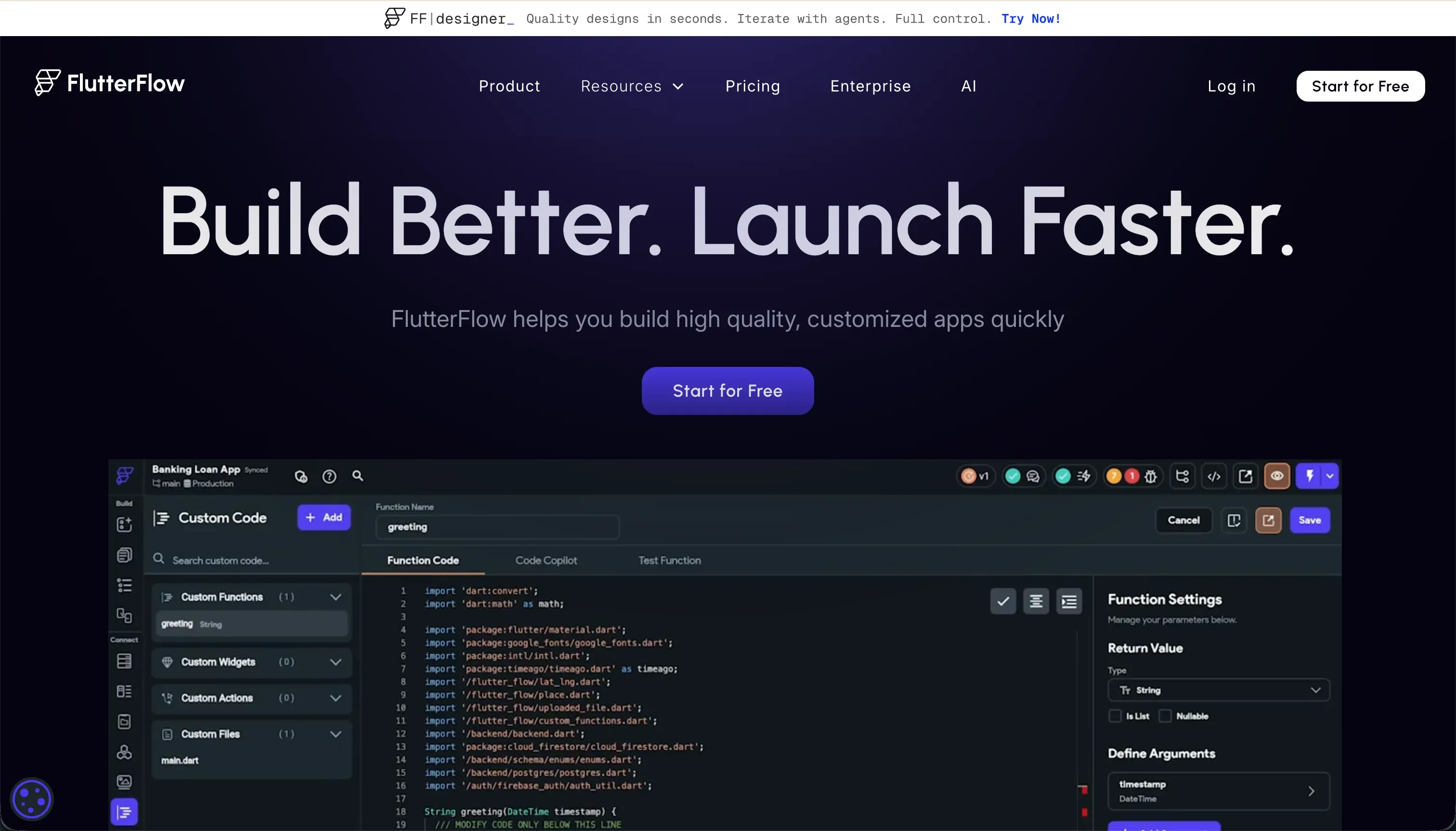
FlutterFlow is a visual builder for native mobile and web apps built on Flutter. Instead of generating a React web stack from prompts, it lets you compose screens and logic visually, then export Dart code and deploy to Apple and Google app distribution channels.
In practice, FlutterFlow revolves around a drag-and-drop Flutter widget tree with actions, state, and backend connections layered on top. Its feature set includes FlutterFlow AI Gen, direct App Store and TestFlight deployment, code export, Git integration, push notifications, and native connections to Firebase and Supabase plus REST APIs. That gives it a much stronger native mobile story than most AI app builders.
It is genuinely built for designers, freelancers, mobile-focused founders, and developers who want to accelerate Flutter app creation without handwriting every screen. The people who bounce off it are usually those expecting simple no-code abstractions, because FlutterFlow still demands a developer mentality around layout constraints, state management, backend setup, and debugging.
| Spec | Details |
|---|---|
| Primary Stack | Flutter-based visual builder that outputs Dart code for native and web apps |
| Interface | Visual widget-tree editor with action configuration, AI generation, and backend integrations |
| Primary Deployment Target | Native iOS and Android deployment through TestFlight, App Store, and Google Play pipelines |
| Key Advantage | Direct path from visual builder to exportable Flutter code and app-store deployment |
The Core Difference
The biggest gap is not AI quality. It is the target medium and the mental model you are buying into: Bolt is web-first AI scaffolding inside a browser dev environment, while FlutterFlow is a visual IDE for Flutter apps that expects you to think in mobile product terms.
- Bolt runs on prompt-driven web code generation and feels most natural when you want to edit files, install packages, and iterate like a developer in the browser.
- FlutterFlow runs on a structured visual Flutter workflow and makes the most sense when native mobile distribution matters more than quick web experimentation.

Head-to-Head Comparison
We evaluated both platforms across four core categories.
1. Developer Experience & Iteration Speed
Bolt is excellent in the first hour. You can prompt a web app into existence, watch the live preview update in real time, install npm packages inside WebContainers, and iterate without touching a local environment. For technical users, that combination of AI scaffolding plus terminal access is one of the more compelling browser-based workflows on the market.
The catch is what happens after the flashy demo. User reports repeatedly mention token-burning edit loops, code regressions, and cases where Bolt rewrites working sections while trying to fix something else. Complaints about builds failing, WebContainer crashes, and the “project too large” limit suggest that iteration speed drops hard once the app becomes non-trivial.
FlutterFlow is slower to feel magical, but more structured once you understand the environment. Visual action configuration, reusable components, and screen-by-screen building can be faster than coding raw Flutter by hand, especially for teams building a real mobile app with repeatable patterns rather than a one-off prototype.
It is not a light builder, though. Reviewers regularly mention a steep learning curve, buried features, and browser lag once projects go beyond roughly 12 screens. The result is a developer experience that feels more consistent than Bolt’s prompt roulette, but also heavier and less forgiving for quick experimentation.
Edge: Bolt, because for raw first-pass iteration speed on web apps it is faster and more flexible, even if that advantage decays as the project grows.
2. Code Quality & Portability
Bolt has the cleaner portability story for web developers. It generates standard React and Vite-style codebases, supports GitHub sync, and lets you export the code rather than trapping you in a proprietary runtime. If your plan is “use AI for scaffolding, then let developers take over,” Bolt makes that realistic.
That said, code ownership is not the same as code quality. Multiple users complain that Bolt can overhaul existing UI, regress working code, or burn through tokens trying to resolve errors. So yes, you can leave with the code, but you may also inherit a mess that still needs serious cleanup.
FlutterFlow also offers real exportability, but the portability is tied to Flutter. On Standard and above you can download builds, and on Pro you get full code export plus Git integration. For teams already committed to Flutter, that is meaningful because you are not locked into a purely hosted black box.
The limitation is ecosystem fit. Exported Dart code is only an advantage if you actually want to live in Flutter afterward, and some reviewers still describe the platform as feeling locked-in for practical reasons because progressing past basic use requires a lot of platform-specific setup knowledge. It is portable, but into a narrower developer lane than Bolt.
Edge: Bolt, because its React-oriented export and GitHub sync are easier for more teams to adopt than exported Flutter code.
3. Database & Backend Capabilities
Bolt can scaffold PostgreSQL schemas and backend logic, which is convenient when the AI gets the shape right. For builders who want the app and backend bootstrapped together, that feels powerful, and Bolt Cloud also bundles user management and authentication so the first version can come together quickly.
The weakness is control and clarity. Bolt has no strong native database admin experience, and users often end up pairing it with external services like Supabase or improvising backend choices through prompts. That means the database story is technically flexible but operationally messy, especially if you are not comfortable reasoning about auth providers, rules, and architecture.
FlutterFlow is more explicit here. It connects natively to Firebase and Supabase and supports REST APIs, so the backend model is clearer than Bolt’s generated-web-app approach. For mobile apps with standard auth, data sync, and API patterns, that explicitness is useful because you know what infrastructure you are wiring up.
But it is not zero-setup. FlutterFlow’s own tradeoff is backend overhead: you still need to configure Firebase or Supabase, think about database rules, and understand relational or stateful behavior. It is better than Bolt for structured mobile backends, yet still too developer-shaped for teams hoping the platform will abstract the hard parts away.
Edge: FlutterFlow, because its Firebase and Supabase integrations are clearer and more durable than Bolt’s loosely generated backend story.
4. Hosting & Deployment Options
Bolt keeps web deployment simple. You can publish to .bolt.host, use custom domains on paid plans, and push to Netlify with minimal friction. That is excellent for demos, internal previews, and fast stakeholder feedback loops where you care more about speed than deployment ceremony.
Its problem is trust at scale. Community complaints mention browser memory crashes, build failures, and infrastructure instability, which matters when hosting is not just a convenience but part of your production path. Deployment is easy, but production confidence is shakier than the marketing implies.
FlutterFlow wins on deployment ambition. Its Pro plan includes codeless deployment to app stores, and the platform is explicitly designed to push builds toward Google Play and Apple TestFlight or App Store distribution. If native mobile shipping is your goal, that is a much more complete answer than anything Bolt offers.
The downside is that deployment becomes part of a heavier release workflow. You are dealing with mobile builds, stores, signing, and the realities of Flutter apps rather than instant web publishing. For the right project that is exactly what you want, but it is still more operational overhead than clicking publish on a web app.
Edge: FlutterFlow, because Bolt can host web apps easily but has no serious answer for native app-store deployment.
5. AI Quality & Reliability
Bolt is aggressively AI-first. It can scaffold the full app from a prompt, refine requests with its Enhance feature, and suggest fixes for build or runtime errors. For greenfield ideas, this is what makes Bolt fun: it feels like a very fast pair programmer that also controls the environment.
It is also where many of Bolt’s biggest complaints come from. Users report opaque token depletion, repeated rewrites that undo prior fixes, and expensive error loops where debugging consumes monthly limits. When the tool’s whole promise depends on AI doing the heavy lifting, unreliable edits become a structural problem rather than a small annoyance.
FlutterFlow’s AI is more contained. FlutterFlow AI Gen helps with screens, components, custom Dart functions, and database schemas, but the product is not purely dependent on conversational editing to keep moving. Once the generated pieces are in place, most work still happens in the visual builder.
That usually makes it less chaotic than Bolt, but it does not make it simple. Debugging complaints, unclear error behavior, and limited support still show up regularly in reviews. The difference is that FlutterFlow’s pain tends to look like complex-builder friction, while Bolt’s pain looks like AI-induced regressions and token waste.
Edge: FlutterFlow, because its AI assists the workflow without becoming the only control surface.
6. Learning Curve & Onboarding
Bolt has the easier on-ramp. The free plan includes 1 million tokens with a 150K daily cap, and the basic mental model is obvious: describe the app, watch code appear, keep iterating. That makes it accessible to curious builders who would never open a conventional IDE first.
The ease is deceptive, though. Once you hit backend questions, runtime errors, or context drift, Bolt quietly expects you to think like a web developer. So it is easy to start but not necessarily easy to finish, especially for non-technical users building something more serious than a prototype.
FlutterFlow is harder from the start because it inherits Flutter’s concepts. Reviewers explicitly call out the steep learning curve, the number of switches and buried options, and the need to understand layout logic, conditional actions, and state. There is a reason experienced FlutterFlow builders are treated almost like a specialty role.
The upside is that the learning curve is at least honest. If your end goal is a real cross-platform mobile app, learning the widget tree, backend integrations, and deployment model is relevant work rather than accidental complexity. It is still a demanding tool, just one whose difficulty maps better to the product category it serves.
Edge: Bolt, because it is dramatically easier to pick up at the beginning, even if FlutterFlow’s difficulty is more purposeful.

Pricing Comparison
Bolt:
- Free - $0 with 1M tokens per month, a 150K daily cap, basic hosting, and public-only projects.
- Pro - starts at $25/month with 10M tokens, private projects, custom domains, and token rollover up to 2 months.
- Teams - starts at $30/member/month with 10M tokens per member, centralized billing, team access controls, and token rollover.
- Pro scaling tiers - $50 for 26M tokens, $100 for 55M tokens, scaling up to $2,000/month for 1.2B tokens.
- Teams scaling tiers - $60/member for 26M tokens, $110/member for 55M tokens, $210/member at 120M tokens, scaling up to $2,000 for 1.2B tokens.
FlutterFlow:
- Free - $0 with the visual builder, Firebase integration, and basic UI components.
- Standard - $22/month billed annually or $30/month billed monthly with APK downloads, custom domain, code export, and local run.
- Pro - $50/month billed annually or $70/month billed monthly with full code export, Git integration, push notifications, translation, and codeless app-store deployment.
- Teams - $50/seat/month billed annually or $70/seat/month billed monthly with collaborative building, shared design library, and team billing.
Use Case Fit: When to use which?
When to choose Bolt
- Choose Bolt when you want to scaffold a web app fast and care more about React code ownership, browser IDE convenience, and GitHub sync than long-term predictability.
- Choose Bolt when your team is technical enough to debug generated code, manage token usage, and work around backend setup choices that the AI does not fully solve.
- Choose Bolt when the app is a prototype, SaaS experiment, or internal demo where fast iteration matters more than airtight production stability.
When to choose FlutterFlow
- Choose FlutterFlow when your actual goal is a native iOS or Android app and you want a visual path to TestFlight, App Store, or Google Play deployment.
- Choose FlutterFlow when you are comfortable with Flutter concepts and want exportable Dart code rather than a React web stack.
- Choose FlutterFlow when your product roadmap is mobile-first and you would rather accept a steeper learning curve than force a web-first tool into native-app territory.
When neither Bolt nor FlutterFlow is the right fit
For internal tools and client portals
Neither Bolt nor FlutterFlow is the tool I would hand to an ops team building a CRM, vendor portal, employee dashboard, or customer-facing workspace. Bolt leaves too much backend and maintenance risk on the table, while FlutterFlow asks business teams to think in mobile widgets, state, and Firebase rules when they really just want software that works for real users.
That is where Softr is the better fit. Softr starts with Softr Databases as the native option, then layers in authentication, user groups, row-level permissions, workflows, and hosting from day one, while still letting teams co-build with AI or edit visually by hand. For business apps, that usually ages better than either prompt-driven web scaffolding or a mobile-first visual IDE.
For professional developer environments
If you want serious local development workflows, both tools have awkward compromises. Bolt gives you an impressive browser IDE, but it is still tied to its hosted token economy and WebContainer limits, while FlutterFlow is not trying to be a general-purpose coding environment at all.
For that use case, Cursor or Replit make more sense. Cursor is the better choice if you already work in a local codebase and want AI help inside a real editor, while Replit is stronger if you want a broader developer environment in the browser without buying into Bolt’s prompt-centric app-builder framing.
For highly custom visual web apps
Bolt is flexible, but the AI can become the source of instability. FlutterFlow can target web, but Flutter Web is rarely the first choice when you care about web-native UX and performance. So if your project is a custom browser-based product with dense workflows and unusual UI behavior, both tools can feel like the wrong abstraction.
In that middle ground, Bubble or WeWeb are usually stronger bets. Bubble is better if you want deep visual programming and can tolerate its complexity, while WeWeb is better if you want a more frontend-oriented web builder without forcing everything through either AI scaffolding or the Flutter runtime.

Verdict
Pick Bolt if you want a web-first AI scaffolding tool that feels close to development, not just generation. It is the better fit for technical users who value React code export, GitHub sync, and the freedom to tinker in a browser IDE. The tradeoff is obvious: you are accepting token economics, higher regression risk, and the very real possibility that day-two maintenance will involve cleaning up AI output rather than simply shipping features.
Pick FlutterFlow if your product is genuinely mobile-first and app-store distribution is part of the brief, not an afterthought. It offers the stronger native deployment path, a clearer backend model through Firebase and Supabase, and a more structured way to build than Bolt’s prompt loops. The tradeoff is that you have to buy into Flutter’s mental model, tolerate a steeper learning curve, and accept that web work is not where the platform feels most natural.
The bigger truth is that neither tool is ideal for the kind of business software most teams actually end up maintaining: internal tools, client portals, CRMs, and multi-role operational apps. That is the day-two problem in plain terms. Owning code is nice, and native deployment is nice, but if the job is stable business software rather than a web prototype or mobile product, Softr usually ages better because the database, permissions, workflows, and editing model are designed for maintainability instead of heroics.

Summary Comparison Table
| Criterion | Bolt | FlutterFlow |
|---|---|---|
| Best for | Fast web prototypes and developer-led SaaS experiments | Native mobile apps and cross-platform Flutter products |
| Build paradigm | Prompt-driven AI scaffolding in a browser IDE | Visual Flutter builder with structured actions and screens |
| Output type | React-style web code and hosted web apps | Flutter/Dart code for iOS, Android, and web |
| Database | Generated backend logic with weaker native DB control | Firebase, Supabase, and REST integrations |
| Pricing metric | Subscription plus token scaling | Seat or plan pricing without token-style build caps |
| Maintenance burden | Higher once AI edits start to regress | High learning curve, but steadier after structure is in place |
| Code export | Yes, with GitHub sync and standard web codebase export | Yes, with Dart code export and Git integration on higher plans |