

Choosing between v0 and Cursor is not really an apples-to-apples comparison - the two tools sit at opposite ends of the development workflow. v0 is a frontend scaffolding tool that generates styled React components from natural-language prompts inside a browser. Cursor is a full-stack AI-assisted IDE for professional developers who already know how to code and want to move faster. The only people who genuinely need to evaluate both are developers deciding whether to use v0 as a design-drafting layer before importing components into a Cursor-managed codebase.
Meet the Contenders
Understanding the design philosophy behind each tool explains most of the differences you will encounter in practice.
What is v0?

v0 is Vercel’s AI frontend assistant. You describe a UI in plain language, upload a screenshot of an existing design, or sketch out a layout idea, and v0 generates a matching React component styled with Tailwind CSS and shadcn/ui conventions. The results are visually polished, immediately previewable in the browser, and exportable to any standard React project. v0 is the fastest way to go from a design idea to a working frontend snippet - but it stops precisely at the frontend layer.
| Spec | Details |
|---|---|
| Primary Stack | React, TypeScript, Tailwind CSS, shadcn/ui, Next.js |
| Interface | Natural language prompt + image/screenshot upload + visual theme editor |
| Primary Deployment Target | Vercel CDN (one-click preview) |
| Key Advantage | High-polish React/Tailwind component generation from prompts or screenshots |
What is Cursor?
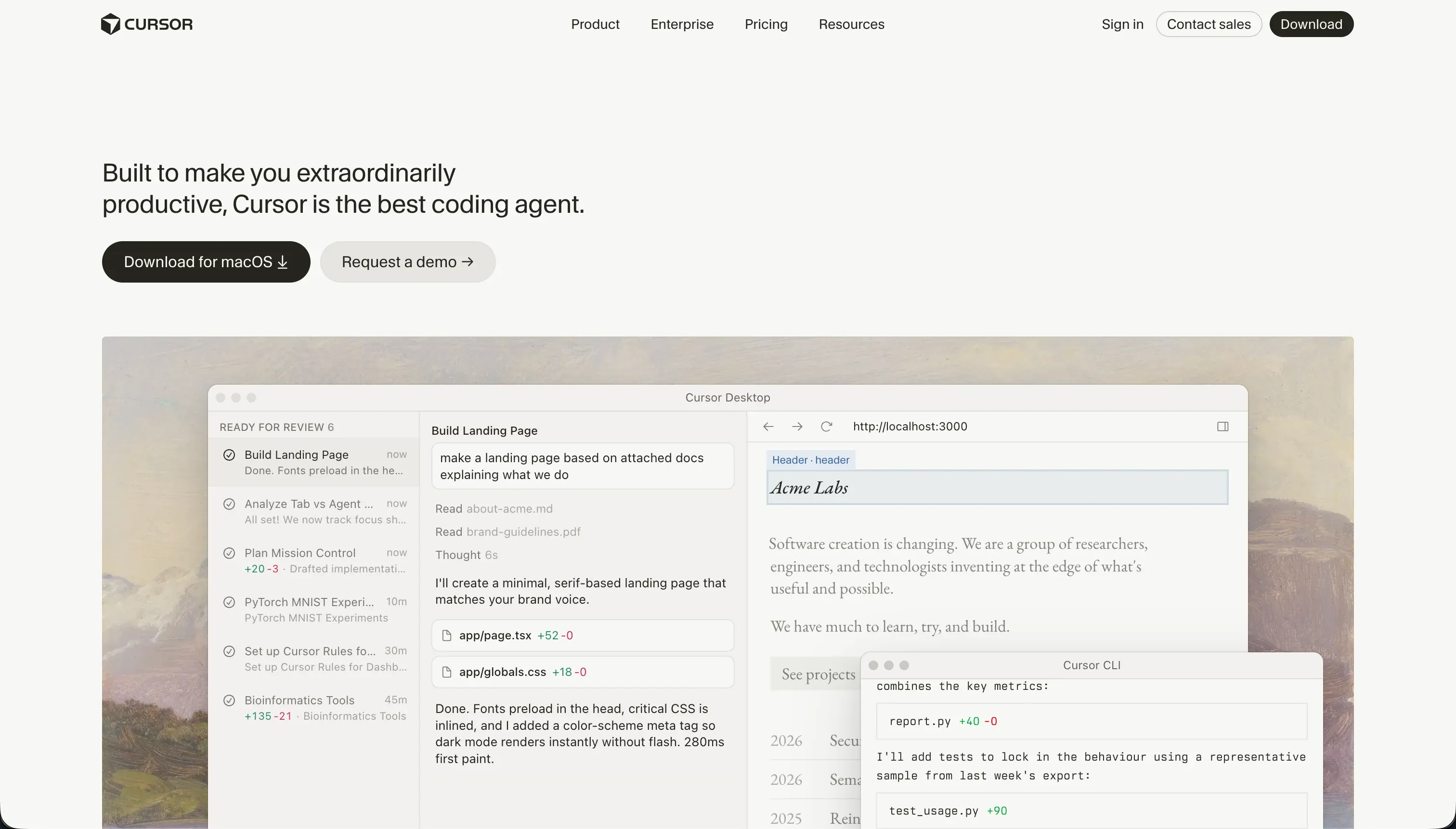
Cursor is an AI-first code editor built as a fork of VS Code. It indexes your entire local project directory, allowing you to ask questions about your codebase, reference specific files and functions using @ mentions, and trigger multi-file edits through the Composer agent. The key differentiator is context: unlike a generic AI chatbot, Cursor understands the structure of your specific project, making its suggestions far more relevant for refactoring, debugging, and extending real codebases. It is designed for developers who already have a project and want to build features faster.
| Spec | Details |
|---|---|
| Primary Stack | Language-agnostic (JavaScript, TypeScript, Python, Go, Rust, and more) |
| Interface | Local VS Code fork with AI chat panel, inline autocomplete, and Composer agent |
| Primary Deployment Target | Developer’s own infrastructure (manual setup required) |
| Key Advantage | Full codebase indexing with multi-file AI editing and context-aware suggestions |
The Core Difference
v0 and Cursor occupy entirely different parts of the software development pipeline, which is why this comparison keeps coming up in developer discussions but rarely produces a clean verdict.
v0 is a browser-native design tool that generates frontend components. You use it before you have a codebase - or when you want to prototype a UI piece separately from the main project. The workflow is: describe a component, get a React file, copy it into your real project. That is the entire loop. v0 does not know about your project’s routing structure, your database schema, your authentication system, or your deployment environment. It just produces a component.
Cursor is what you use after you have a codebase. It lives inside your local development environment alongside your terminal, your package manager, and your running dev server. The Composer agent can edit five files at once to implement a new feature, refactor a module, or debug a test failure. It understands what your code does because it has read it. This makes it genuinely useful for production-level engineering work.
The comparison often comes up because both tools are marketed with AI prominently and both produce code. But the actual user of v0 is often a designer or non-technical founder wanting a quick UI prototype. The actual user of Cursor is a software engineer who writes code every day and wants a 2x productivity multiplier. These are almost never the same person.

Head-to-Head Comparison
1. Developer Experience & Iteration Speed
v0 is fast for its specific use case. Generating a UI component from a screenshot or a text description takes seconds, and the results are immediately visible in a preview panel. The design quality is high by default because v0 generates against the shadcn/ui system, which is a well-maintained, visually consistent component library. For early design exploration - generating landing page sections, data table layouts, or form interfaces - v0 has no competition for raw speed.
The problem is what happens after the first five prompts. User feedback on v0 is consistent: quality degrades significantly past the initial generation. Code that works well in the first response starts accumulating issues as you iterate. The AI begins producing hallucinated component imports from packages like lucide-react or shadcn/ui submodules that do not actually exist. Tailwind class combinations get increasingly messy and redundant. One community reviewer described the output after extended sessions as requiring “a lot of time cleaning up the Tailwind CSS output.” The React component structure also deteriorates - page-level React components grow massive instead of being decomposed into proper reusable components.
Cursor’s developer experience is fundamentally different because it is not a sandbox - it is your actual project. The iteration speed advantage comes from the Composer agent’s ability to hold context across a large codebase and make coordinated changes across multiple files. A task like “add a new user authentication role with its own dashboard route and database table” can be described in one prompt, and Composer will create or edit multiple files to implement it. The risk, documented extensively in developer communities, is that Composer in agent mode can make unintended changes to peripheral configuration files. If it touches a Tailwind config or a tsconfig during a supposedly unrelated task, the resulting bugs can take hours to trace. This is not a dealbreaker, but it demands that users commit changes incrementally and review diffs carefully.
2. Code Quality & Portability
v0 produces clean, standard React code in the initial output. Components are well-structured and use modern patterns like the shadcn/ui primitive system, which is broadly respected in the React ecosystem. The code is readable and portable - you can drop it into any Next.js or Vite project without modifying the structure. Portability from v0 to a real development environment is theoretically straightforward, but practically the community has documented consistent friction around npm dependency conflicts when running locally. One Reddit thread specifically identifies that “Vercel has intentionally made it extremely annoying to migrate from v0 to a real IDE” because the local environment toolchain (particular Tailwind v4/v3 splits and React peer dependencies) is configured specifically for Vercel’s deployment environment.
Another issue that has surfaced in security-conscious teams is that v0 has been reported to inject tracking and telemetry tags into generated components - a concern for developers building applications with data privacy requirements.
Cursor’s portability story is clean by design. The editor writes to your local files using standard languages and frameworks. There is no proprietary wrapper, no vendor-specific import, and no platform-level dependency. You can close Cursor and open the exact same project in any other editor without losing anything. This is one of Cursor’s most important architectural decisions - it makes the tool genuinely tool-complementary rather than platform-locking. Enterprise teams concerned about data privacy, however, have flagged Cursor’s background codebase indexing and cloud-based AI processing as a compliance concern, with multiple G2 reviews noting difficulty getting Cursor approved by security teams.
3. Database & Backend Capabilities
v0 has no database capabilities, and this is not a limitation being worked on - it is a core positioning decision. v0 is a frontend tool. This means if you want to build an application that stores user data, handles authentication, or connects to any kind of persistence layer, v0 cannot help you beyond generating the visual component that displays that data. Every single API call, every authentication header, and every database query must be written manually by a developer after v0’s job is done.
Cursor can write database code in any language and framework. Ask it to generate a Prisma schema, write a Postgres migration, set up NextAuth with a database adapter, or design a REST API endpoint in FastAPI - and it will produce working code drawing from the context of your existing project structure. The important caveat is that Cursor writes code, it does not execute it. If the generated SQL migration has a destructive operation or the authentication middleware has a logic flaw, Cursor will not catch it autonomously. Cursor’s Composer mode has been reported to occasionally introduce subtle dependency issues in peripheral configuration files when making what should be isolated backend changes - leading to situations where the feature works but an unrelated test suite breaks.
The net result for backend work: Cursor is a significant productivity accelerator for developers who know what they are doing, but it does not reduce the requirement for engineering expertise. It makes a skilled developer faster, not a non-developer capable.
4. Hosting & Deployment Options
v0 integrates naturally with Vercel’s deployment infrastructure. From the v0 interface, you can deploy a preview to Vercel’s CDN in one click. For frontend-only projects like landing pages or marketing sites, this is genuinely convenient. The limitation is that Vercel’s deployment model is optimized for Next.js and Vercel’s own ecosystem - deploying a v0 component into a self-managed environment or a different cloud provider requires manual configuration of build pipelines, environment variables, and framework-specific settings.
A community-documented bug worth flagging: after Vercel updated its default Tailwind CSS version to v4, projects created in v0 with Tailwind v3 started producing deployment errors. This is the kind of platform-level dependency issue that happens when your deployment environment is tightly coupled to a proprietary toolchain.
Cursor does not deploy anything. Hosting is 100% the developer’s responsibility. This is not a weakness - it is a deliberate design choice that makes Cursor compatible with any hosting environment imaginable (Vercel, Netlify, AWS, GCP, Railway, Fly.io, self-hosted VMs). The developer configures CI/CD, sets up environment variables, and manages deployment pipelines manually. For experienced developers, this flexibility is exactly what they want. For anyone hoping to get a production application running without DevOps knowledge, Cursor offers zero assistance.

Pricing Comparison
v0 moved from an unlimited-prompt model to credit-based billing in 2026, and the community reaction has been strongly negative. Under the current model:
- Free: $5 of included monthly credits, limited to 7 messages/day
- Team: $30/user/month, includes $30 of monthly credits per user plus $2 of free daily credits on login
- Business: $100/user/month, same credit structure as Team but adds training opt-out and centralized billing by default
- Enterprise: Custom pricing, SAML SSO, RBAC, priority access
Credit consumption depends entirely on which model you select. v0 Mini runs at $1/$5 per million input/output tokens. v0 Pro runs at $3/$15. v0 Max at $5/$25. v0 Max Fast at $30/$150. During active design sessions where you are iterating on a complex layout, the v0 Pro and Max models will exhaust a monthly credit allocation quickly. Multiple users report finishing their entire credit budget in a single day of serious work. The “pay for failed attempts” dynamic - where credit is consumed even when the AI returns incorrect or unusable output - has been the single most common complaint in post-2026 v0 reviews.
Cursor’s pricing is comparatively stable and developer-friendly:
- Hobby (Free): 50 fast queries per month
- Pro: $20/month, 500 fast queries per month
- Pro+: $60/month, 1,500 fast queries (3x limits)
- Ultra: $200/month, 10,000 fast queries (20x limits)
- Business/Teams: $40/user/month
Cursor’s main pricing complaint in the developer community is opacity around rate limit reductions. Multiple developers report that Cursor silently reduced fast request limits without announcement, leading to unexpected slowdowns mid-session. The “slow” query mode, which kicks in when fast limits are exhausted, has been described as “unusable - taking 2-3 minutes per prompt.” That said, Cursor’s $20/month Pro tier represents strong value for professional developers compared to equivalent AI-assisted coding tools.
Use Case Fit: When to use which?
When to choose v0
- You need to rapidly prototype a React component or landing page layout from a description or screenshot.
- You are a designer or non-technical founder who needs a believable UI mockup to validate ideas or pitch investors.
- You already have a full-stack project built elsewhere and want a fast way to scaffold new page sections before integrating them manually.
- Your deployment target is Vercel and you want seamless CDN preview for frontend-only projects.
When to choose Cursor
- You are a professional developer building production software and want your IDE to understand your entire codebase.
- You spend significant time on refactoring, debugging, and writing tests - tasks where codebase context is critical.
- Your project spans multiple files, services, and languages, and you need an AI that can coordinate changes across all of them.
- You want an AI coding assistant that works with any language, framework, or hosting environment without vendor constraints.
When neither v0 nor Cursor is the right fit
v0 and Cursor are both tools for people who write code or are comfortable working adjacent to it. When the goal is building functional software that real users can log into, manage, and update without a developer standing by, both tools fall short in different ways.
For native mobile apps (iOS & Android)
Neither v0 nor Cursor provides a native mobile compilation pipeline. v0 generates web components. Cursor can help write React Native or Flutter code, but packaging, signing, and submitting apps to mobile stores is a manual process requiring Xcode, Android Studio, and developer program memberships. If you need native iOS and Android apps with push notifications, offline storage, and direct App Store distribution, FlutterFlow is purpose-built for that workflow. It provides a visual builder over Flutter’s layout system and includes codeless pipelines that push builds directly to Google Play and Apple TestFlight.
For internal tools and client portals
Managing a generated React codebase as your primary business software is a liability for most non-engineering teams. When a form breaks, when a permission rule stops working, or when you need to add a new user role, the answer is always “ask the developer.” For operational business software - client portals, internal dashboards, custom CRMs, inventory apps - Softr is the more sustainable choice. Its AI Co-Builder generates complete applications with database tables, authentication, user groups, and navigation from a single prompt. Then, unlike code-generation tools, non-technical operators can continue maintaining and evolving the app visually without touching code. Running low on AI credits in Softr never blocks you from updating the app, because every change the AI can make can also be done manually in the visual editor.
For professional developer environments
If you are already a developer evaluating AI-assisted tools, the comparison between v0 and Cursor is almost certainly not what you need. For full-stack development with AI assistance, Cursor is the clear winner in this comparison. But Cursor also has capable competitors: Replit offers a cloud-based development environment with virtual machines, collaborative coding, and integrated Replit Agent for autonomous task execution - useful for teams that want to avoid local environment setup. The choice between Cursor (local, VS Code-based) and Replit (cloud, browser-based) comes down primarily to where you prefer to work.

Verdict
v0 and Cursor are not competing for the same user. Treating them as alternatives to each other only makes sense if you are asking “which tool helps me generate code faster” as an abstract question without considering the workflow they each fit into.
Choose v0 if you are designing UI components and want AI to generate them as React/Tailwind code. It is a visual design accelerator that happens to output standard web code. It is excellent for the first hour of a new page’s life and loses reliability quickly after that.
Choose Cursor if you are a developer building and maintaining a real codebase. It does not scaffold apps from scratch as elegantly as purpose-built code generators, but it is the most capable AI coding assistant for day-to-day engineering work on an existing project - provided you have the engineering skills to verify and correct what the AI produces.
If your goal is building software that non-technical users can maintain and update, neither tool gets you there without significant additional developer investment.
Summary Comparison Table
| Feature | v0 | Cursor |
|---|---|---|
| Build Paradigm | AI Frontend Component Generator | AI-Assisted Local Code Editor |
| Output Type | React / TypeScript / Tailwind CSS | Language-Agnostic Source Files |
| Database | None (frontend only) | None (developer writes all backend code) |
| Visual Permissions | None | None (developer implements manually) |
| Pricing Metric | Subscription + Token-Based Credits | Flat Monthly Subscription (query limits) |
| Maintenance Burden | High (developer needed for any full-stack work) | High (requires full-stack developer) |
| Code Export | Yes (React components, portable) | Yes (local file editing, zero lock-in) |