

VibeCode and Bolt both sell the same dream at first glance: describe an app in plain English and let AI do the scaffolding. But they sit in different categories once you look closer. VibeCode is a mobile-first native app builder aimed at shipping iOS and Android apps, while Bolt is a browser-native web app coding environment built around React, Node.js, and fast iteration. This is less a simple feature comparison than a choice between native mobile generation and web-first code generation.
The people actually deciding between these two are usually founders, solo builders, or product teams trying to avoid hiring a full mobile or frontend team too early. What is really at stake is not just speed, but whether you end up locked into prompt loops, token burn, fragile code, or the wrong deployment target entirely. If you need Apple App Store or Google Play distribution, the answer tilts one way fast. If you need GitHub-friendly web code, package installs, and a browser IDE, it tilts the other way.
Meet the Contenders
What is VibeCode?
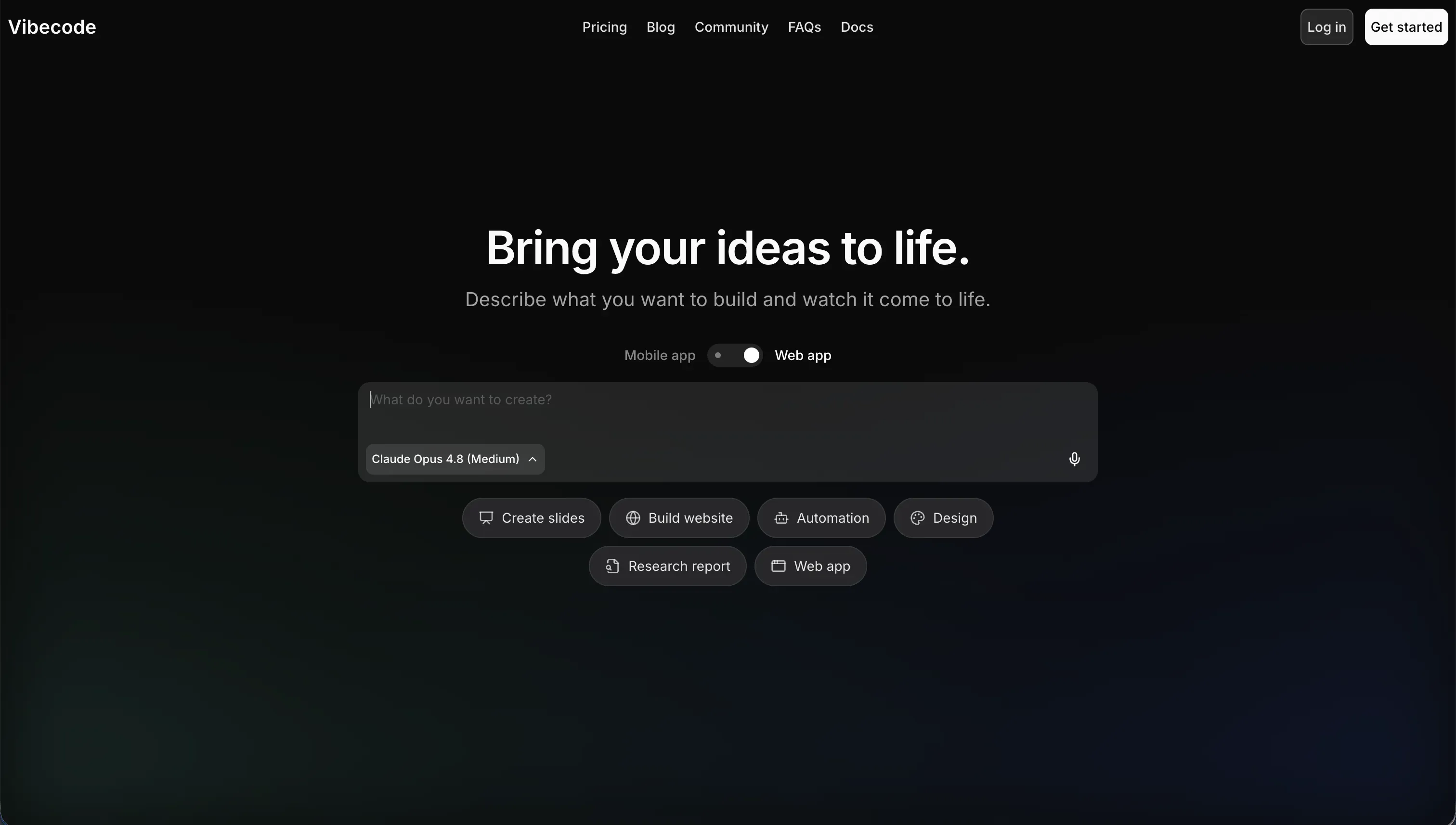
VibeCode is an AI-powered, mobile-first app builder designed to create native mobile apps from natural-language prompts. Its whole pitch is that you can describe an app in plain English and have the platform generate, test, and publish mobile software without manually building in Swift, Kotlin, or React Native.
In practice, VibeCode bundles prompt-based app generation with a built-in backend database, user authentication, cloud storage, and direct app store deployment on paid plans. Higher tiers also add code export and SSH access, which means a developer can pull the project out and continue working in tools like Cursor or VS Code instead of staying trapped in the hosted editor forever.
It is genuinely built for mobile prototypers, indie creators, and non-technical users who specifically want native iOS and Android apps. The people most likely to get frustrated are the ones who assume “AI made the app” means they can skip software judgment forever, because VibeCode still hits a complexity wall on larger apps and lower tiers keep the best escape hatches locked away.
| Spec | Details |
|---|---|
| Primary Stack | AI-generated native mobile apps with built-in backend, auth, and cloud storage |
| Interface | Prompt-driven mobile app builder focused on natural-language generation |
| Primary Deployment Target | Native iOS and Android apps published to the App Store and Google Play |
| Key Advantage | True mobile-first workflow with direct app store deployment from prompts |
What is Bolt?

Bolt is a browser-based AI app builder that behaves more like a lightweight development environment than a pure no-code tool. It generates full-stack web apps from prompts, but the real differentiator is that it also gives you a Node.js environment in the browser through WebContainers, so you can install packages, run commands, and inspect the code directly.
In practice, Bolt can scaffold React components, Node.js backend logic, routing, styling, and PostgreSQL schemas in one pass, then lets you iterate inside a live preview with prompt enhancement, smart debugging, GitHub sync, and exportable code. It also supports deployment to .bolt.host and Netlify, plus private projects and custom domains on paid plans.
It is built for builders who still want AI speed but do not want to surrender the entire app to a black-box prompt flow. The people who get frustrated are usually non-developers or unlucky heavy users who hit token drain, project-too-large limits, container crashes, or the familiar problem where the AI “fixes” one thing by rewriting three others.
| Spec | Details |
|---|---|
| Primary Stack | AI-generated React and Node.js apps running in browser-based WebContainers |
| Interface | Prompt-first builder plus full browser IDE, terminal, and live preview |
| Primary Deployment Target | Web apps deployed to Bolt Cloud, .bolt.host domains, or Netlify |
| Key Advantage | Real in-browser developer workflow with code export and GitHub sync |
The Core Difference
The biggest difference is not code generation quality. It is what kind of product each tool is actually trying to ship for you after the first prompt.
- VibeCode runs on a mobile-first native app model, where AI is primarily there to turn prompts into iOS and Android apps that can reach real app stores.
- Bolt runs on a web-first developer environment model, where AI handles scaffolding but the product is still a browser IDE with files, packages, terminals, and exportable code.
Head-to-Head Comparison
We evaluated both platforms across four core categories.
1. Developer Experience & Iteration Speed
VibeCode has the cleaner initial story if your app belongs on a phone. You prompt the app in plain English, get native mobile layouts, and work inside a workflow that is already optimized for iOS and Android instead of trying to fake mobile inside a desktop-first builder. For a solo founder testing a lightweight utility or mobile MVP, that first hour is probably easier than setting up a React Native stack from scratch.
The problem is what happens once the app stops being simple. The research is clear that VibeCode can struggle as logic complexity grows, especially around custom data pipelines, advanced auth patterns, and larger codebases where the AI loses context. That means iteration speed can collapse right when the project becomes real, because every change still depends on prompt quality and the platform’s ability to reason about a growing app.
Bolt is unusually strong at the first-day developer experience because it combines prompt-to-app generation with an actual browser development environment. You can scaffold an app, inspect the generated files, install npm packages, run terminal commands, and use the live preview without leaving the browser, which is why technical founders keep reaching for it instead of simpler prompt boxes.
But Bolt’s iteration story gets messy under load. User complaints repeatedly mention token-burning edit loops, regressions where Bolt rewrites existing working code, and even “project too large” errors that can stop prompting entirely. So yes, Bolt feels faster when you know how to work around code, but it also makes you pay for the privilege of debugging the AI’s mistakes.
Edge: Bolt, because its browser IDE and file-level control make iteration more practical for technical users even if the token burn and regressions are real.
2. Code Quality & Portability
VibeCode does have a real escape hatch, but it is tiered. On Pro at $50 per month and Max at $200 per month, you get full source-code export and SSH access, which is much better than classic no-code lock-in and gives developers a path to continue the project elsewhere if they outgrow the platform.
The catch is that lower tiers do not get that benefit. Free and Plus users are effectively stuck in the hosted product, which means portability is not a core property of VibeCode so much as a paid privilege. That is fine if the app stays small, but it becomes more uncomfortable if the generated code starts drifting or you want outside debugging help earlier.
Bolt is stronger here because code ownership is part of the product identity, not an afterthought on upper plans. It exports standard React and Vite codebases, supports GitHub sync, and does not rely on a proprietary format that makes migration painful. For technical buyers, that matters more than marketing copy about “AI building for you.”
That said, owning code is not the same as owning good code. Bolt can export what it generates, but community complaints show that generated code can still regress, get overhauled unexpectedly, or require manual cleanup before it is production-ready. So Bolt wins portability cleanly, but not effortless maintainability.
Edge: Bolt, because exportable standard web code and GitHub sync beat VibeCode’s higher-tier-only escape hatches.
3. Database & Backend Capabilities
VibeCode includes a built-in backend database, user authentication, and cloud storage, which is exactly what a mobile MVP builder should do. That makes it easier for non-developers to get past the boring setup work and focus on the app itself instead of wiring backend services from scratch.
Still, this is not the same thing as a rich backend admin layer. The research points to complexity walls around advanced data flows and larger app logic, which suggests the backend is convenient but not especially deep when the app grows into something with nuanced rules or heavier production demands. VibeCode solves the “get moving” problem better than the “operate this system for a long time” problem.
Bolt can generate backend logic and PostgreSQL schemas in one pass, which sounds full-stack on paper and is often enough for early web prototypes. The advantage is flexibility: because Bolt lives in a browser IDE, technical users can shape the backend architecture more directly than they can in a pure mobile prompt builder.
The weakness is that Bolt does not have a native database UI or a truly opinionated backend layer for non-developers. Research explicitly flags the lack of direct native database control, and community threads regularly spiral into questions about whether Supabase is overkill, how auth should be wired, or which backend service should catch submissions. That is a lot more backend ambiguity than the marketing suggests.
Edge: VibeCode, because its built-in mobile backend is more turnkey out of the box while Bolt often pushes users back into backend decision fatigue.
4. Hosting & Deployment Options
This is where VibeCode earns its place. It is built around native mobile deployment, and paid tiers support direct publishing to the Apple App Store and Google Play Store. If your success condition is “users install this from an app store,” that is not a small feature difference, it is the whole game.
The tradeoff is that store-ready output raises the stakes on app quality. A fragile mobile app with edge-case crashes or awkward performance is not just annoying internally, it can fail review or create user-facing damage faster. So VibeCode has the stronger deployment target for mobile teams, but it also makes AI quality matter more because the destination is a real native release channel.
Bolt is much more web-native. You can publish to .bolt.host, use Netlify deployment, add custom domains on paid plans, and ship a shareable web app extremely fast. For SaaS previews, internal demos, and stakeholder review links, this is honestly one of Bolt’s best traits.
But Bolt is simply not the answer if you need native app store distribution. The research includes direct user complaints that Bolt does not produce the package you need for the Apple Store, because it is primarily a web app tool. That is not a bug, just a category mismatch people keep discovering too late.
Edge: VibeCode, because native app store deployment is something Bolt fundamentally does not offer.
5. AI Quality & Reliability
VibeCode’s AI is compelling when the app brief is narrow and mobile-shaped. The platform can turn prompts into native app flows, connect APIs, and provision backend basics without making the user think about every implementation detail, which is why it is attractive to non-technical mobile creators.
The warning signs are also straightforward. The research highlights code hallucinations, context loss in larger codebases, and day-two production risk once apps get more complex. In other words, VibeCode is impressive while the app is still legible to the model, then much less comforting once the surface area grows.
Bolt’s AI is more ambitious because it is trying to scaffold full web apps while also refactoring code, debugging issues, and rewriting files inside a real development workspace. Features like prompt enhancement and smart debugging are genuinely useful, and rapid web prototypes are one area where Bolt still looks excellent.
But the public complaints are harsher here because the tool invites more complex use. Users report wasted tokens on unnecessary errors, code rewrites that remove recent changes, build failures, crashing WebContainers, and accounts getting blocked by project-size limits even when tokens remain. That is a rough reliability profile for something positioned as a faster way to build software.
Edge: VibeCode, because both tools can drift, but Bolt’s documented regressions, token waste, and container failures make its AI reliability feel more chaotic in practice.
6. Learning Curve & Onboarding
VibeCode is easier to understand if you are thinking like a creator, not a developer. The product story is simple: prompt a mobile app, use the built-in backend, and push toward deployment. Even the pricing model is relatively legible, since $1 in credits equals $1 in raw AI usage with no markup.
That simplicity does not fully protect beginners later. Once the app grows and the AI starts losing context, a non-technical user still needs enough judgment to diagnose whether the problem is prompting, architecture, or the platform’s limits. So VibeCode is easier to start, but not necessarily easier to finish well.
Bolt has a steeper floor because it behaves like a developer tool even when marketed to broader builders. WebContainers, package installs, terminal commands, GitHub sync, deployment choices, and backend setup decisions are all powerful, but they assume some comfort with modern web development concepts.
For technical users, that is a strength rather than a flaw. For everyone else, it means Bolt often feels easy only until something breaks. At that point the learning curve spikes fast, because understanding a broken React app is still understanding a broken React app, no matter how nicely the AI scaffolded it.
Edge: VibeCode, because its mobile-first prompt model is easier for non-technical users to grasp before the inevitable complexity wall shows up.

Pricing Comparison
VibeCode:
- Free - $0/month with $2.50 included credits and access to premium AI models.
- Plus - $20/month with $20 included credits and 1 active deployment.
- Pro - $50/month with $55 included credits, 3 active deployments, code export, and SSH access.
- Max - $200/month with $220 included credits and 5 active deployments.
Bolt:
- Free - $0 with 1M tokens per month, a 150K daily cap, basic hosting, and public-only projects.
- Pro - starts at $25/month with 10M tokens, private projects, custom domains, and token rollover up to 2 months.
- Teams - starts at $30/member/month with 10M tokens per member, centralized billing, and team access controls.
- Pro scaling tiers - 26M tokens for $50/month, 55M for $100/month, with higher tiers scaling up to 1.2B tokens for $2,000/month.
- Teams scaling tiers - 26M tokens for $60/member/month, 55M for $110/member/month, 120M for $210/member/month, scaling up to 1.2B tokens for $2,000/month.
Use Case Fit: When to use which?
When to choose VibeCode
- Choose VibeCode when your main goal is shipping a native iOS or Android app instead of a web app wrapped in mobile styling.
- Choose VibeCode when you want built-in backend, auth, and app store deployment in one mobile-first workflow.
- Choose VibeCode when you are comfortable accepting prompt-driven complexity risk in exchange for faster mobile MVP creation.
When to choose Bolt
- Choose Bolt when you want an in-browser dev environment with files, terminal access, package installs, and live preview alongside AI scaffolding.
- Choose Bolt when code export, GitHub sync, and portability matter more than turnkey native mobile deployment.
- Choose Bolt when your target is a web app or SaaS prototype and you have enough technical skill to debug AI-generated code.
When neither VibeCode nor Bolt is the right fit
For internal tools and client portals
Neither VibeCode nor Bolt is the tool I would hand to an ops team that needs a CRM, vendor portal, internal dashboard, or partner workspace to keep working month after month. VibeCode is optimized for native mobile shipping, while Bolt is optimized for web code generation, and both still leave you exposed to the classic day-two problem where every meaningful change can drag you back into debugging generated code.
That is where Softr is the more honest fit. It starts with Softr Databases as the native data layer, then gives you visual user groups, row-level permissions, authentication, hosting, workflows, and AI Co-Builder help without forcing you to stay in prompt loops forever. For business apps used by employees, clients, or vendors, that hybrid model ages much better than either native mobile vibe coding or browser-based code scaffolding.
For professional developer environments
If you are a serious developer and your standard for a tool is “can I shape architecture directly without fighting platform limits,” neither product fully nails it. VibeCode is too specialized around mobile AI generation, and Bolt, while much stronger, still inherits the instability of a prompt-centric builder with documented token waste, container crashes, and project-size headaches.
In that case, Cursor or Replit are the more credible alternatives depending on how you work. Cursor is the better fit if you already want a local IDE with AI help woven into real coding workflows, while Replit makes more sense if you want a hosted development environment that feels like actual software development rather than app generation theater.
For visual app builders with deeper workflow control
Some buyers do not want either native mobile AI generation or browser IDE scaffolding. They want a visual system for building structured apps with more explicit control over workflows, UI state, or frontend composition, but without relying entirely on prompts to keep the product coherent.
That is where FlutterFlow, Bubble, or WeWeb are better category matches. FlutterFlow is the clear pick if you still need native mobile output with a more visual builder model, Bubble is stronger for dense visual logic, and WeWeb is a cleaner option when you want a more flexible frontend-oriented builder than either VibeCode or Bolt.

Verdict
Pick VibeCode if your brief starts with mobile distribution, not web convenience. It is the better fit when you specifically need native iOS or Android output, app store deployment, and a mobile-first builder that handles backend basics for you. The tradeoff is that you are accepting a narrower product with higher long-term risk once the app grows beyond a clean promptable MVP.
Pick Bolt if you want AI scaffolding wrapped around a real browser development environment. It is the stronger choice for technical users who care about exportable React code, GitHub sync, npm installs, and the ability to inspect or override what the AI produced. The tradeoff is that you are still volunteering for token economics, regression risk, and more debugging than the marketing would like to admit.
The day-two reality is that both tools still ask you to live with generated code in different forms. One points that risk at native mobile, the other points it at web architecture. If the project is actually a business system with user roles, workflows, records, and non-technical owners, Softr is usually the tool that ages better because it gives you AI speed on top of stable visual infrastructure instead of making AI-generated code the foundation of the whole app.

Summary Comparison Table
| Criterion | VibeCode | Bolt |
|---|---|---|
| Best for | Native mobile MVPs and app store launches | Web apps, SaaS prototypes, and browser-based coding |
| Build paradigm | Prompt-driven native mobile app generation | AI scaffolding inside a browser IDE |
| Output type | Native iOS and Android apps | React and Node.js web apps |
| Database | Built-in backend database, auth, and cloud storage | Generated schemas and backend logic, but no rich native DB UI |
| Pricing metric | Dollar-based AI credits plus deployment limits | Monthly token caps with daily and project-size constraints |
| Code export | Available on Pro and Max only | Standard code export and GitHub sync |
| Maintenance burden | Rises sharply as mobile logic gets more complex | High once regressions, token burn, or backend setup issues start |