

Bolt and Softgen both sit in the AI app builder category, but they come from different instincts. Bolt is closer to AI scaffolding inside a browser-native coding workspace, while Softgen is a conversational app generator built around chat-led creation. Both promise fast app creation, code generation, hosting, and a shorter path from idea to working web app. The real tradeoff is not first-hour speed. It is how much control you still have once the generated app needs edits, debugging, and structure.
Meet the Contenders
What is Bolt?

Bolt is an AI-powered full-stack app builder built on a browser-native development environment. It is basically the tool you pick when you want AI to scaffold a React app quickly but still want access to files, packages, terminal commands, and deployable code instead of a fully abstracted no-code layer.
In practice, Bolt uses WebContainers to run a real Node.js environment in the browser, so you can install npm packages, run dev servers, import GitHub repos or Figma designs, and iterate on generated React and backend logic with a live preview. It also supports code export, GitHub sync, one-click deployment to .bolt.host or Netlify, and AI-powered debugging and refactoring inside the workspace.
It is genuinely built for developers, technical founders, and ambitious makers who want AI acceleration without giving up code ownership. The people most frustrated by it are usually non-technical builders or teams that expected the AI to handle everything, because user reports repeatedly mention token burn, project-size limits, container crashes, and the need for manual debugging when the generated code drifts.
| Spec | Details |
|---|---|
| Primary Stack | AI-generated React frontend, Node.js logic, routing, state, and PostgreSQL schemas |
| Interface | Browser-based editor with WebContainers, live preview, terminal access, and prompt-driven generation |
| Primary Deployment Target | Hosted web apps on Bolt Cloud or Netlify, with .bolt.host publishing and custom domains on paid plans |
| Key Advantage | Fast AI scaffolding inside a real in-browser dev environment with exportable code and GitHub sync |
What is Softgen?
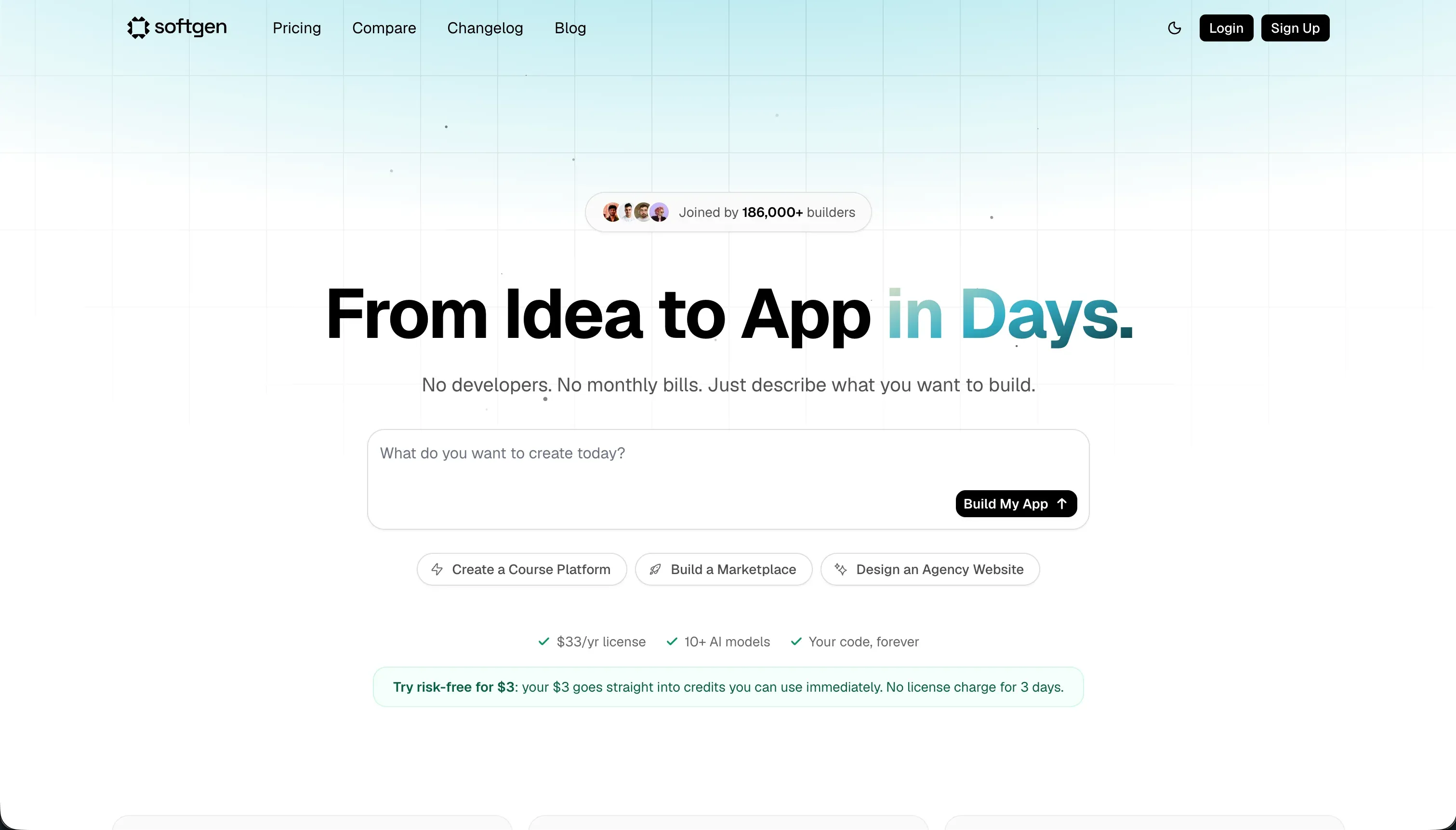
Softgen is a conversational AI application builder focused on generating web apps through chat. Its pitch is simpler than Bolt’s: describe the app, let the AI plan and build it, then keep refining through the assistant instead of working inside a more developer-heavy environment.
In practice, Softgen centers on its Cascade AI agent, which helps outline app structure, generate UI and relational database schemas, add user authentication, and handle integrations like Stripe payments. It also offers one-click deployment to Softgen hosting, custom domains, conversational styling tweaks, and code export if you eventually want to leave the platform.
It is genuinely built for indie hackers, creators, and MVP-focused founders who want to get a SaaS layout or lightweight app online quickly without wrestling with a full coding workspace. The people most likely to get annoyed are builders who care about deep visual precision or long-term maintainability, because reviews and analyst summaries keep pointing to prompt loops, a customization ceiling, and pay-as-you-go credits that can get unpredictable once iteration starts.
| Spec | Details |
|---|---|
| Primary Stack | Conversational AI-generated web apps with relational database, auth, and hosted deployment |
| Interface | Chat-first builder driven by the Cascade AI agent for planning, generation, and edits |
| Primary Deployment Target | Softgen-hosted web apps with custom domain support |
| Key Advantage | Low base entry cost with a simple conversational workflow for quick MVP creation |
The Core Difference
The biggest difference is how much of the building experience feels like software development versus guided prompting. Bolt tries to give you AI plus a real browser IDE, while Softgen keeps you in a simpler chat-led creation loop.
- Bolt runs AI scaffolding inside a browser-native coding workspace, so you get more control, more portability, and more engineering overhead.
- Softgen runs as a conversational builder first, so it feels lighter up front but leaves more of your iteration flow dependent on prompts and credit spend.
Head-to-Head Comparison
We evaluated both platforms across four core categories.
1. Developer Experience & Iteration Speed
Bolt is impressive in the first session because it does not just generate code, it gives you a live browser workspace where that code actually runs. WebContainers, terminal access, npm installs, live preview, and prompt enhancement make it feel closer to a real dev environment than most AI builders.
The catch is that iteration speed gets worse as projects grow. User reports mention diff-based edits rewriting working code, web container crashes, and even “project too large” limits that can stop prompting entirely, which means the same openness that makes Bolt attractive also exposes you to more moving parts and more failure modes.
Softgen is easier to grasp because the workflow is narrower. You chat with Cascade, generate the app structure, tweak layouts and copy through prompts, and deploy without thinking much about local tooling, packages, or terminal commands.
That simplicity cuts both ways. Once you want exact UI changes or repeated refinement, the lack of a drag-and-drop builder pushes you back into chat loops, and research repeatedly flags prompt iteration overhead as the main reason the tool starts feeling slower than it looked in the demo.
Edge: Softgen for raw simplicity, because its chat-first flow is easier to start with than Bolt’s more technical workspace.
2. Code Quality & Portability
Bolt has the clearer portability story. It generates standard React-style codebases, supports direct export, and includes GitHub sync, which is a serious advantage for teams that want AI scaffolding now and developer cleanup later.
That does not automatically mean the code is clean. Bolt users still report regression-heavy rewrites and large overhauls that break functioning UI, so portability is good, but quality control still depends on the builder being able to review and repair what the AI produced.
Softgen also offers code export, which is better than being trapped in a closed visual format. For indie builders who just want optional escape velocity later, that is a meaningful feature and keeps Softgen from being a total lock-in story.
But the research around Softgen is much thinner on code quality specifics and stronger on limits around customization. Reviews suggest that once you go beyond the initial AI-generated structure, manual coding may be required, which weakens the value of code export for less technical users who assumed the chat loop would stay sufficient.
Edge: Bolt, because GitHub sync and a more explicit exportable code workflow make it the stronger choice for teams that care about portability.
3. Database & Backend Capabilities
Bolt can generate PostgreSQL schemas and backend logic in one pass, which is great for technical users who want the AI to scaffold full-stack foundations instead of only painting UI. It also includes built-in hosting and integrated user management, so the top-level story looks fairly complete.
The problem is control after generation. Bolt lacks a native database admin layer, so teams often end up relying on generated code or external backend tools, and community discussions show the usual next step is figuring out Supabase, Netlify Forms, or other infrastructure that Bolt did not really simplify as much as promised.
Softgen’s backend story is more approachable on paper for non-developers because it includes relational database schemas, auth, and common integrations like Stripe inside the conversational setup. That makes it feel more like a packaged AI app generator than a dev tool with AI attached.
The weakness is depth and trust at scale. Public critiques point to a maintainability tradeoff and a customization ceiling, which suggests Softgen is fine for standard SaaS patterns but less convincing once the backend needs unusual logic, exact permissions, or lots of structural evolution.
Edge: Bolt, because even with its rough edges it gives technical users more backend flexibility than Softgen’s more templated conversational setup.
4. Hosting & Deployment Options
Bolt offers several deployment paths, which matters more than it first seems. You can publish to .bolt.host, deploy to Netlify, use custom domains on paid plans, and keep the code close to standard web workflows rather than a single opaque hosting target.
Still, the hosted experience has reliability caveats. Users have reported build failures, browser out-of-memory issues, and web container crashes on larger projects, so deployment flexibility is good, but the path from preview to trustworthy production is not always smooth.
Softgen keeps deployment intentionally simple with one-click publishing to its own hosting and custom domain support. For founders trying to validate an idea, that low-friction path is part of the product’s appeal because it removes the usual deployment ceremony.
The downside is that simplicity usually comes with less infrastructure choice. The available research positions Softgen more as a hosted app generator than a flexible deployment platform, so if your team wants multiple hosting targets, detailed environment control, or a more developer-native release flow, it starts to feel limited quickly.
Edge: Bolt, because it offers more credible deployment flexibility than Softgen’s simpler but narrower hosting model.
5. AI Quality & Reliability
Bolt is strong when the AI gets the first pass mostly right. It can scaffold full-stack apps from a prompt, enhance prompts before generation, and even suggest debugging or refactoring fixes without forcing you to leave the workspace.
The problem is the cost of bad generations. Reddit complaints repeatedly describe tokens being burned on broken edits, destructive rewrites, or no meaningful change at all, which makes Bolt feel powerful but expensive when the AI slips into a repair loop instead of a productive loop.
Softgen’s AI feels more opinionated and guided, which can be an advantage if your use case fits its assumptions. Cascade helps outline app architecture, produce layouts, and manage edits conversationally, so the system may feel more coherent for straightforward MVPs than a looser coding workspace.
But Softgen has its own reliability tax. Analysts and reviews point to visual rigidity, template constraints, and credit burn during active updates, which means the AI is easier to steer only as long as your requests stay close to the default patterns the system already likes.
Edge: Softgen for simple app flows, because its narrower AI scope can be more predictable than Bolt’s broader but more failure-prone generation.
6. Learning Curve & Onboarding
Bolt is easy to access and hard to truly master. The free plan gives 1 million tokens with a 150K daily cap, so experimenting costs little at first, and the browser editor removes local setup friction for people who want to prototype immediately.
But the mental model still assumes you understand code, packages, errors, and architecture. Once you hit debugging, auth setup, backend choices, or scaling issues, Bolt stops feeling beginner-friendly and starts feeling like a developer tool wearing a conversational interface.
Softgen is easier for non-developers in the early phase because the product keeps the builder inside a single conversational lane. The annual membership is only $33 per year before usage credits, which makes the initial commitment feel low and lowers the barrier for hobbyists.
The limitation is that simplicity does not remove complexity, it postpones it. When you want exact control, unusual layouts, or repeated revisions, Softgen’s chat-only editing model becomes the learning curve, and users run into the practical limit that every serious change means more prompting and more credits.
Edge: Softgen, because it asks less technical context from a beginner than Bolt does.

Pricing Comparison
Bolt:
- Free - $0 with 1M tokens per month, a 150K daily cap, basic hosting, and public-only projects.
- Pro - starts at $25/month with 10M tokens, private projects, custom domains, and token rollover up to 2 months.
- Teams - starts at $30/member/month with 10M tokens per member, centralized billing, team controls, and token rollover.
- Pro scaling tiers - 26M tokens for $50/month, 55M for $100/month, scaling up to 1.2B tokens for $2,000/month.
- Teams scaling tiers - 26M tokens for $60/member/month, 55M for $110/member/month, 120M for $210/member/month, scaling up to 1.2B tokens for $2,000/month.
Softgen:
- Annual Membership - $33/year for platform access and hosting rights.
- AI Usage Credits - pay-as-you-go credits purchased separately for AI generation and updates.
Use Case Fit: When to use which?
When to choose Bolt
- Choose Bolt when you want AI scaffolding inside a real browser-based dev environment with terminal access, npm installs, and exportable code.
- Choose Bolt when GitHub sync, standard web deployment paths, and partial code ownership matter more than simplicity.
- Choose Bolt when your team has enough technical ability to tolerate debugging, token management, and occasional regressions in exchange for flexibility.
When to choose Softgen
- Choose Softgen when you want a lighter conversational builder for a simple MVP, directory, or SaaS layout and do not want a dev-tool-heavy interface.
- Choose Softgen when a low base cost matters and you prefer annual access plus pay-as-you-go credits instead of a bigger monthly subscription.
- Choose Softgen when your app fits standard patterns and you are comfortable doing most iteration through chat rather than a richer visual or coding environment.
When neither Bolt nor Softgen is the right fit
For internal tools and client portals
Neither Bolt nor Softgen is the tool I would trust first for an ops-heavy portal with real user roles, row-level access, and constant day-two edits. Both are still centered on generated code or prompt-led iteration, which is exactly where non-technical teams start accumulating fragile logic, unclear permissions, and a maintenance headache after the exciting first demo.
This is the use case where Softr is the better answer. It starts with Softr Databases as the native data layer, then adds built-in auth, user groups, row-level permissions, workflows, hosting, and an AI Co-Builder that is fast but not mandatory. That means a team can generate the first version with AI, then maintain pages, permissions, forms, and business logic visually without reopening a prompt loop every time something small changes.
For native mobile apps
Bolt and Softgen are both fundamentally web app builders. Bolt user feedback explicitly notes that what it generates is not the same packaging required for Apple App Store publication, and Softgen is also positioned around hosted web application generation rather than native mobile binaries.
If the goal is true app-store distribution, start with FlutterFlow. If you want a more approachable mobile-first path and can accept more constraints, Adalo or Glide are better bets than trying to stretch either Bolt or Softgen into a native mobile workflow they were not built to handle.
For professional developer environments
Bolt is closer to a dev environment than Softgen, but it is still an AI app builder first, and its WebContainer issues, token caps, and browser limits show up quickly on serious projects. Softgen is even less suitable here because its chat-first model is optimized for guided generation, not for teams that want direct architectural control over every file and workflow.
If you want AI in a serious coding setup, Cursor or Replit make more sense. Cursor is stronger if you already prefer local-first development with AI assistance inside a real editor, while Replit is better if you want a fuller cloud IDE rather than a prompt-led builder that keeps fighting your engineering habits.

Verdict
Pick Bolt if you want the more powerful technical option and you actually intend to work with code. It is the better fit for developers and technical founders who value GitHub sync, exportable code, Netlify deployment, terminal access, and the ability to get their hands back on the steering wheel when the AI gets weird. The tradeoff is obvious: you accept token caps, browser-container instability, and a much higher chance that fixing the app will still require real engineering judgment.
Pick Softgen if you want the easier conversational path to a lightweight MVP and care more about speed and simplicity than deep control. Its $33 yearly membership plus pay-as-you-go credits lowers the starting cost, and the chat-first workflow is easier to understand than Bolt’s browser-native dev environment. The tradeoff is that you are buying into a narrower system with less visual precision, more prompt dependence, and a lower ceiling once the app needs unusual layouts or long-term maintainability.
The bigger truth is that both tools are strongest on day one and shakier on day two. If you are building a real internal tool, CRM, client portal, or multi-user ops app, the problem is not whether you can generate code quickly, but whether your team can safely maintain it after launch. That is where Softr usually ages better, because it gives you AI speed on top of a production-ready no-code foundation with Softr Databases, visual permissions, workflows, and manual control when the prompts stop being helpful.

Summary Comparison Table
| Criterion | Bolt | Softgen |
|---|---|---|
| Best for | Technical founders and developers shipping web app prototypes | Indie hackers and creators validating simple MVPs through chat |
| Build paradigm | AI scaffolding inside a browser IDE | Conversational AI app generation |
| Output type | Exportable React-style web app code with deploy paths | Hosted generated web app with optional code export |
| Database | Generated PostgreSQL schemas, but no native database UI | AI-generated relational database setup for standard app patterns |
| Pricing metric | Monthly subscription plus token limits | Annual access fee plus pay-as-you-go AI credits |
| Maintenance burden | Medium to high once prompts start breaking working code | Medium to high once chat-only iteration hits customization limits |
| Code export | Yes, with GitHub sync and standard code export | Yes, but with less evidence of a mature portability workflow |